


We tested a Flutter app on the iPhone Duo simulator in 21 scenarios. What breaks, what works and what to fix first, from text forms to the hinge.
Apple shipped the iPhone Duo on October 23. If you have a Flutter app in the store, it already runs on the device. Nothing to migrate, no new SDK, no build changes.
That is good news and it is also the catch. Because nothing crashes, nothing shows up in your crash reporter, and nobody on your team finds out which screens look wrong until a customer mentions it.
So we went and measured. We built a probe app that reports everything Flutter knows about the screen it is drawing on, and we put it through twenty-one situations on the iPhone Duo simulator: both displays, all three postures, rotated, split beside another app, with the keyboard up. A screenshot and a full data dump of each.
The short version
- Your app runs. No migration. It looks broadly right on both screens.
- Three habits stop working: reading the screen size once at startup, assuming the left and right margins match, and treating device size as a proxy for how much room you have.
- Flutter cannot see the fold yet on iOS. Half open and fully open look identical to your code.
- Folding does not lose anything. No state is wiped, no screen is rebuilt.
- Start with your forms. Of the seven iPhone Duo bugs Flutter's own QA team filed in September, five involve the keyboard or text fields.
- Do not build anything hinge-aware yet. The upstream work is real, but it was not in a stable release when the device shipped.
- Your AI agent will get this wrong, quietly. The device is newer than its training data, and the plausible answer it gives you runs without error and does nothing.
What the iPhone Duo is and why Flutter teams should care
A 5.4-inch display on the outside when it is closed. A 7.6-inch display on the inside when you open it. A hinge down the middle. Announced September 9, on sale October 23.
The honest framing for anyone deciding where a sprint goes: this is a first-generation premium device, and it will not be a large share of your users in year one. Counterpoint Research forecast Apple taking 46% of the North American foldable market in 2026, which sounds enormous until you remember that foldables are still a small slice of all phones.
What makes it worth the attention anyway is that the work is not Duo-specific. Almost everything below also improves your app on iPad, in landscape, in split-screen and on the web. The Duo is the deadline, not the reason.
Here is what your app actually receives, in logical pixels, the unit Flutter lays out in:
| Situation | Size your app gets | Safe-area padding |
|---|---|---|
| Closed, portrait | 466 × 678 | right 84, bottom 34 |
| Closed, landscape | 678 × 466 | left 84, bottom 34 |
| Open, portrait | 669 × 951 | top 82, bottom 34 |
| Open, landscape | 951 × 669 | right 84, bottom 34 |
| Half open | 951 × 669 | right 84, bottom 34 |
| Open, beside another app | 469 × 669 | bottom 34 only |
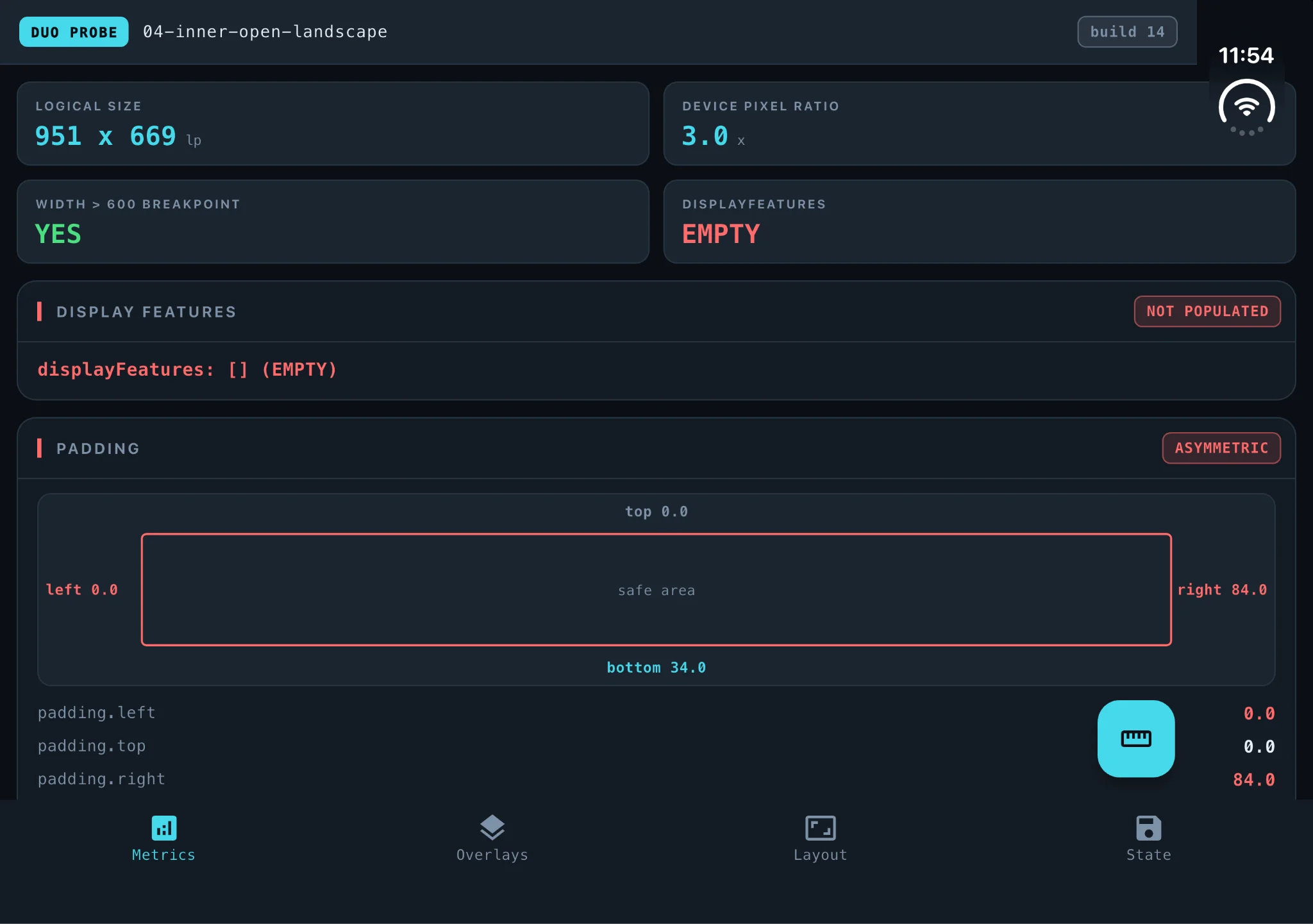
Six different layouts, on one device, that a user can move between in seconds. That is the whole story.
First, the good news
We expected folding to be destructive. It is not.
We took the app through a full cycle, half open to closed to fully open, which physically moves it from one display to the other and blanks the screen for a few seconds on the way. Nothing was lost. No screen was recreated, no initState ran a second time, and the page we were watching was still the same instance at the end. A user filling in a form can fold the phone, show someone a photo, open it again, and their text is still there.
Split View behaves too. When your app sits visible beside another one and the user taps the other app, Flutter reports no change at all. The app stays resumed. If you pause video or timers when the app goes inactive, they will not pause here, which is the behaviour you want.
And rendering is fine. The Flutter team made that point publicly on September 26, posting a video of Wonderous running on the device with the caption "We just checked, Flutter still runs everywhere." They are right. The problem is not drawing pixels.
What actually changes
Three assumptions that most Flutter codebases carry, including good ones, stop being true at the same time.
1. The screen size is no longer something you learn once
In plain terms: your app can change size while the user is using it, and it will not be told.
The device goes from 466 points wide to 951 while running. Anything your code worked out at startup from the screen size is now wrong, and the usual way to notice would be a rebuild.
There is no rebuild. We counted. Our root widget built four times at launch and stayed at four through the entire fold cycle. The size change gets absorbed further down the tree, below LayoutBuilder and MediaQuery, so anything hanging off a top-level build, a cached layout decision, a size-based calculation, an analytics event, never fires.
What to do: read sizes inside build, from LayoutBuilder constraints or MediaQuery.sizeOf(context). Never in initState.
2. The margins are not the same on both sides
In plain terms: the Duo reserves a wide strip along one edge of the screen, and which edge it is depends on how you are holding it. A layout that looked centred ends up pushed to one side.
Look at the table again. There is a large inset on exactly one edge: right when open in landscape, left when closed in landscape, top when open in portrait, and nothing at all in Split View.
Which means the common shorthand EdgeInsets.symmetric(horizontal: 16) is correct in two of those six states and wrong in three. The two it survives are the ones you reach first when you open the simulator, which is exactly how this reaches production.
It is also not a system toolbar. Reading the reserved regions from the native API shows a camera cutout, 84 by 120 points when open in landscape. iOS then reserves the width of that cutout along the entire opposite edge. That amounts to roughly 44,000 square points of perfectly good screen that a standard SafeArea will never let you draw on, on the device whose whole selling point is more screen.
What to do: SafeArea takes per-edge flags. Turn off the ones you do not need and reclaim the space.
3. A big device no longer means a wide app
In plain terms: the user can put a second app next to yours, and yours gets narrower than a phone.
Open Split View on the unfolded display and your app gets 469 logical pixels. That is below almost every tablet breakpoint anyone has written, on the largest screen Apple has ever put on an iPhone. Flutter also reports the orientation as portrait at that moment, because the pane is taller than it is wide.
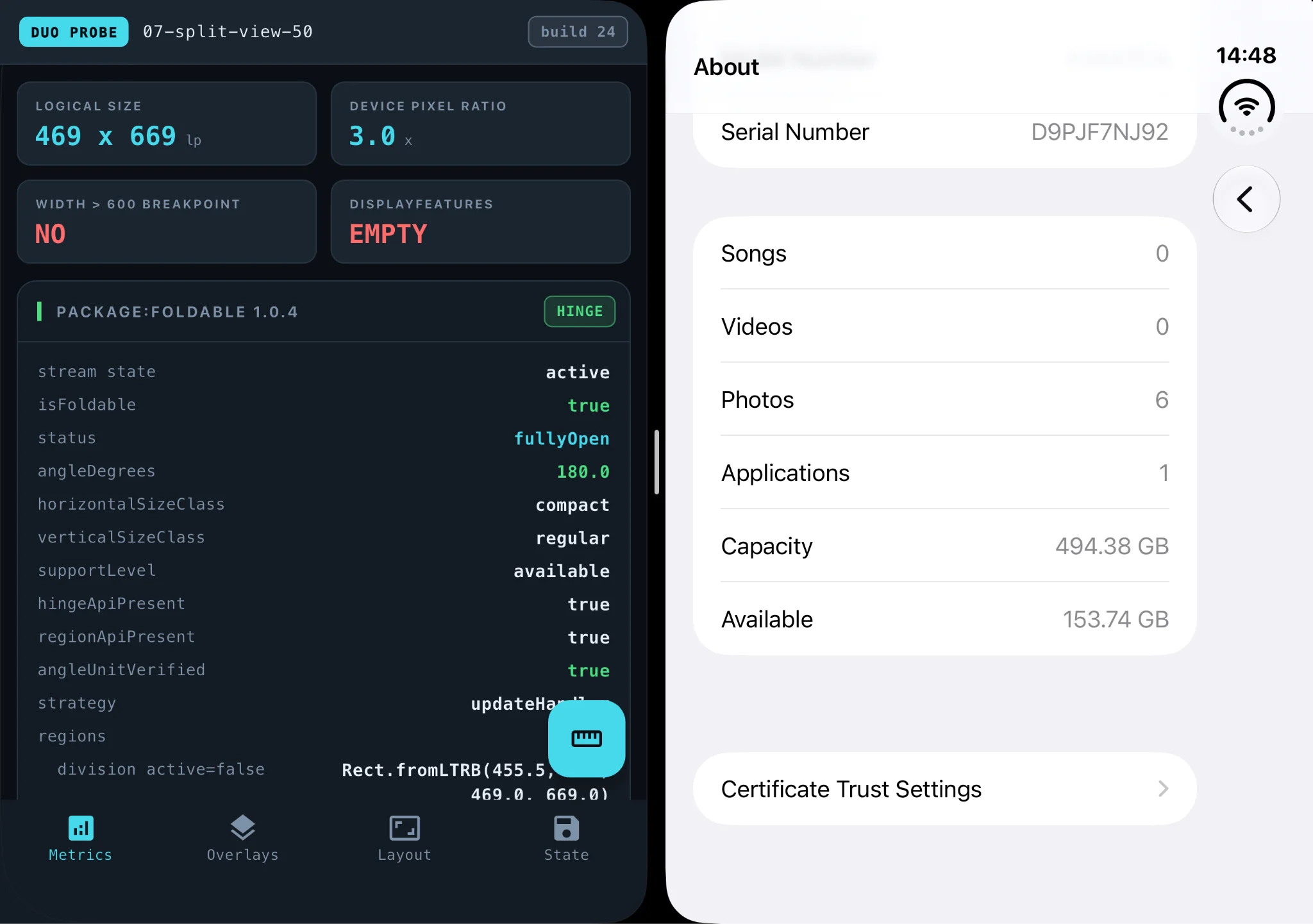
This is also the only situation we measured where the left and right padding match. So an app that finally got the asymmetric margin right will watch that asymmetry vanish and come back as the user moves in and out of Split View, seconds apart, on the same screen.
What to do: add 469 × 669 to whatever set of sizes you test layouts against. It is worth having regardless of the Duo, as a cheap stand-in for a narrow pane on a big display.
The three of them together
All three fixes fit in one build method, and none of them are Duo-specific:
The thing Flutter cannot do yet
In plain terms: Flutter has no way to know the phone is folded.
This part is documented rather than discovered, and it is the single most important thing to understand before anyone plans work.
Flutter has supported foldables for years. MediaQuery.displayFeatures reports hinges, folds and cutouts, and the framework uses it internally to keep dialogs off a hinge. The official documentation states the limitation in one line:
"This is populated only on Android."
The implementation lives in Flutter's Android layer. The iOS side has no equivalent. In all twenty-one situations we measured, on both displays, in every posture, the list came back empty.
The information does exist. In the same frame where Flutter reported nothing, the foldable package reported the device as partially open at 127.8 degrees, with the fold as a 40-point band down the middle of the screen and the camera cutout as a second rectangle.
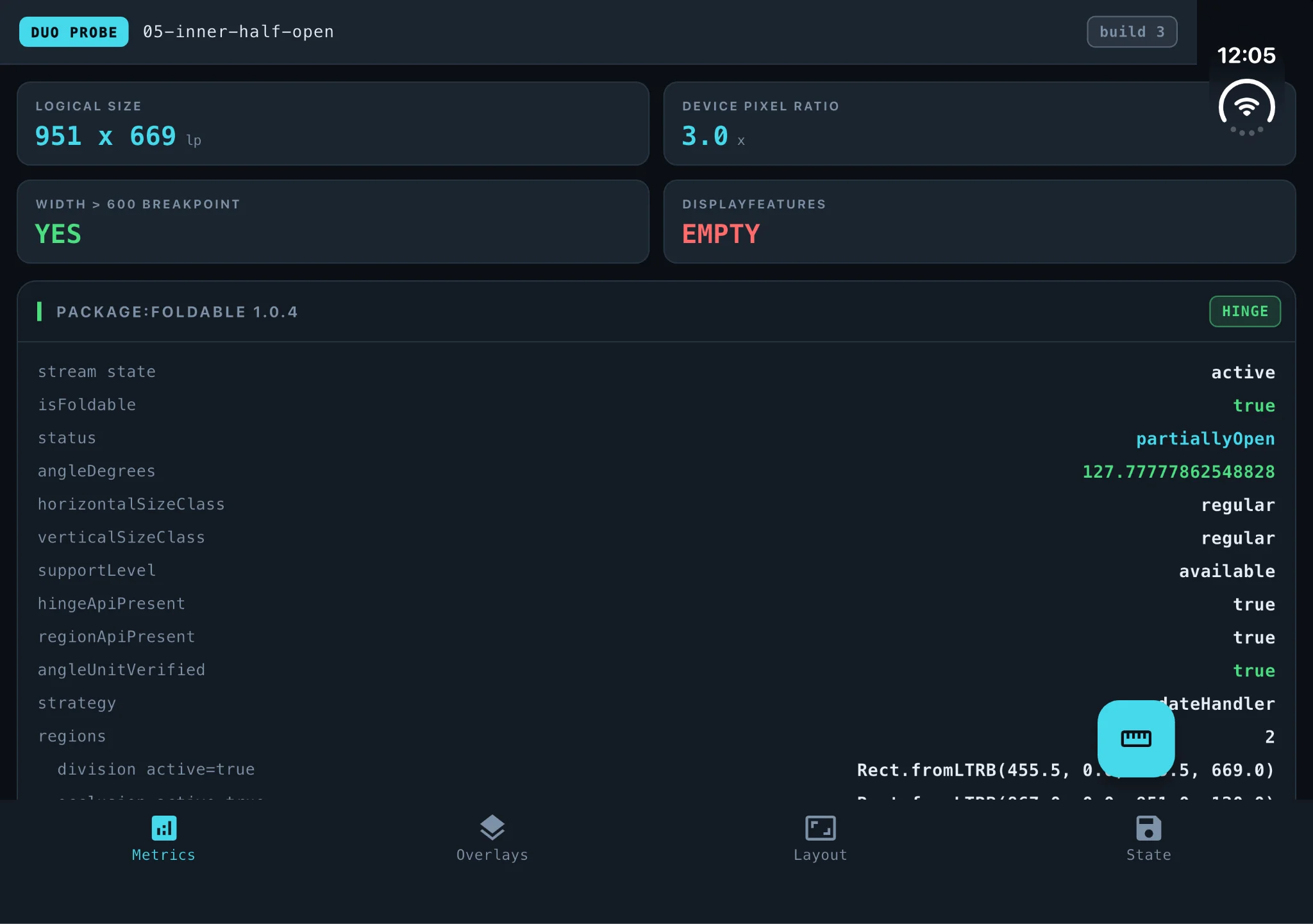
Two consequences follow, and both matter.
Half open is invisible. Propped on a table at 128 degrees, your app sees exactly the same size and padding as fully flat. Nothing in layout and nothing in the app lifecycle tells the two apart.
Folding sends no signal. The app crosses between two physical displays, with the screen black for several seconds, and receives zero lifecycle events. didChangeMetrics fires and the size changes, so your code can tell that something happened. Nothing tells it what.
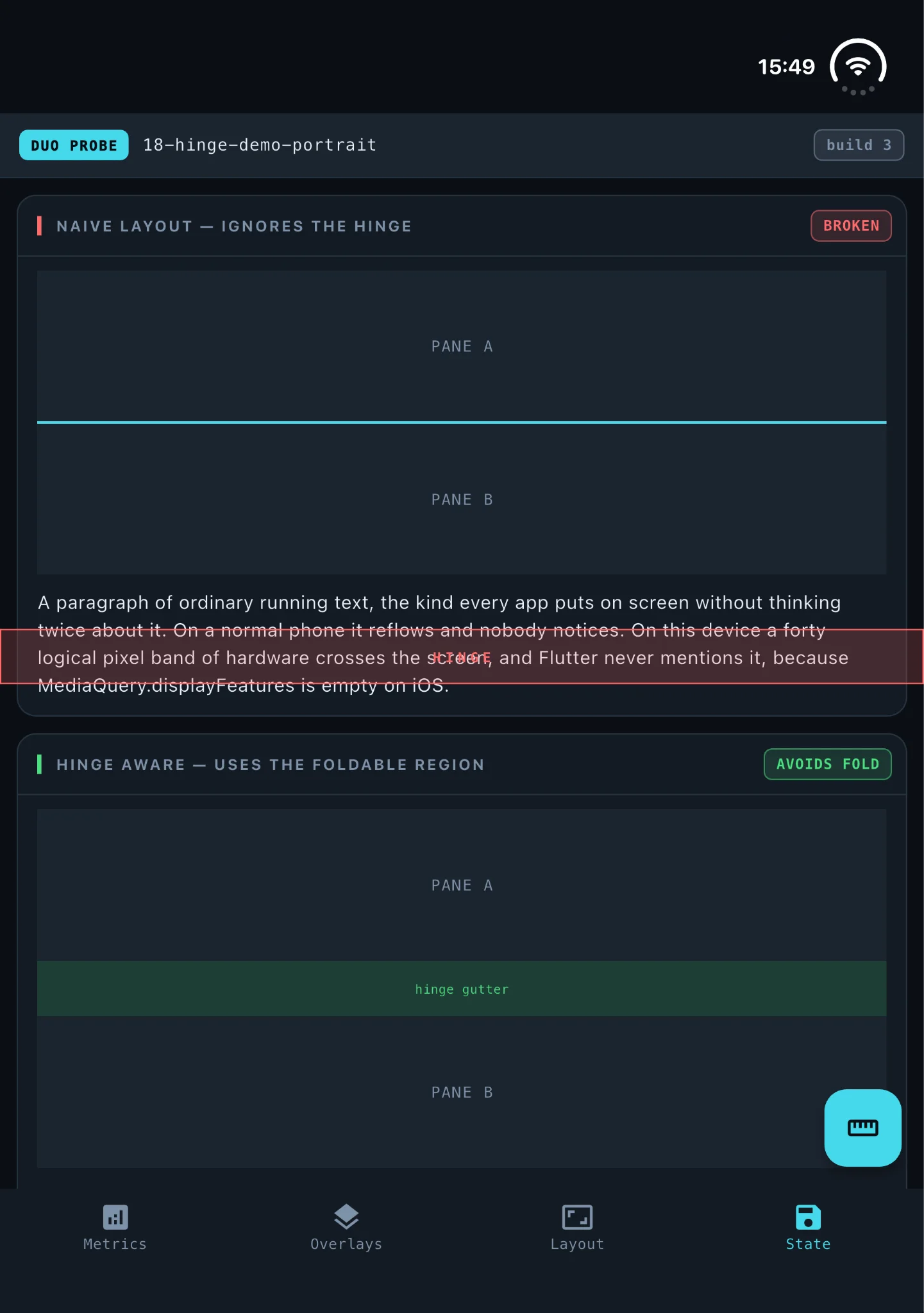
That has a visible cost. The fold sits dead centre and rotates with the device, vertical in landscape, horizontal in portrait. A two-pane layout that splits down the middle puts its divider exactly on the hinge. So does a centred button, a centred logo, or a line of body text.
What Apple is asking for, and how far Flutter can follow
This is the part most coverage skips, and it is where the gap is widest.
Apple's guidance for the Duo, across its Tech Talks, is not "handle a bigger screen". It asks for three specific things.
Design for size classes, not for poses. Compact width on the outer display, regular width on the inner one, and no logic keyed to a specific device state. Flutter handles this well today. It is a code-review habit, not a framework gap.
Move controls to the side edges. The inner display is wide and squat, so Apple wants toolbars and tab bars running down the edge rather than across the bottom, to preserve vertical space and keep actions in reach. Flutter has no equivalent today. Material's navigation rail is the closest thing, and it is not the same pattern. There are open requests to make Flutter's navigation chrome move to the sidebar automatically based on fold state, and none of them have landed.
Use displacement when the device is half folded. Apple's recommendation is to shift interactive elements into the lower half when the phone is propped open, so they are reachable while the device sits on a table. Flutter cannot do this at all right now, for the reason in the previous section. It does not know the phone is half folded.
So: one of the three is a matter of discipline, and two of the three are blocked on Flutter itself. That is a useful thing to be able to tell a stakeholder who has watched the Apple video and is asking why the app does not look like that.
What broke when we went looking
Four findings, in the order we would prioritise them.
Your forms are the highest risk
With the keyboard open, Flutter reported the keyboard taking 264 points of the screen. We changed the posture without closing it. The next reading was 0.26. The keyboard had closed itself.
That matches a known issue, and it is not an isolated one. Between September 21 and 23, Flutter's own QA team filed seven iPhone Duo bugs, and five of them involve text input: the keyboard not coming back, the emoji keyboard not restoring, the text cursor disappearing, autocomplete suggestions vanishing, and a crash during a keyboard layout transition.
If you only have one afternoon, this is where to spend it. Open a form, type something, fold the phone, open it again.
A locked orientation stops being a guarantee
Plenty of screens lock themselves to portrait or landscape. Video players, camera flows and games do it routinely.
Closed, at 466 × 678, asking for landscape worked and the app turned to 678 × 466. Fully open at 951 × 669, asking for portrait did nothing at all. iOS explained why:
Note what it blames. Not the display, but the current windowing mode. We did not isolate which of the two is the real cause, so take this as the behaviour we measured rather than a settled explanation. Either way, the practical advice is the same. If a screen locks its orientation, it needs to look right without the lock.
Dialogs and sheets ignore the room you give them
On the inner display in landscape, with 951 points available, an AlertDialog holding a deliberately enormous child painted at 787 points. A date picker painted at 496. A bottom sheet at 640.
The date picker is the one to look at. It uses 52% of the available width on the inner display and 75% on the much smaller outer one. It gets proportionally narrower as the screen gets bigger, which is the opposite of what anyone wants.
Video letterboxes badly
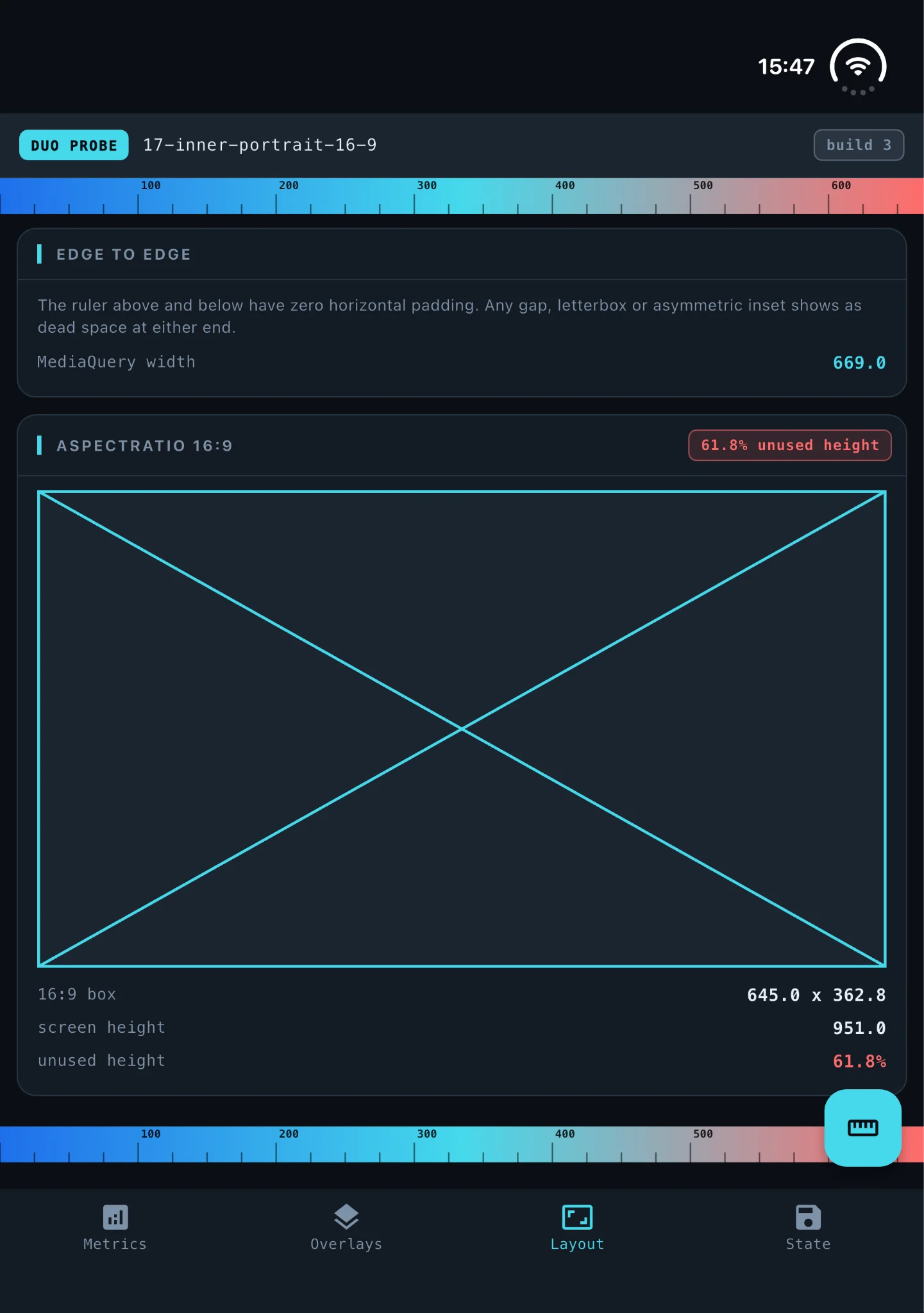
A 16:9 box across the available width leaves 22% of the height empty on the inner display in landscape, and 62% in portrait. The inner screen is close to square, far squarer than a phone held sideways.
What did not break
Negative results are worth publishing, because they save someone a day.
Navigation bars are fine. A reported issue says tab bar width gets truncated when folded. Flutter has four widgets that could reasonably be called a tab bar, so we measured all four on both displays. Eight measurements, every one filling the width it was given, exactly.
The App Switcher preview is fine. Another issue says the preview renders distorted after a device mode change. Ours rendered correctly after crossing all three postures.
Neither result closes those issues, since a negative in one setup says little about the reporter's. But if you were about to budget time for either, it may not be where your problem is.
The black screen during folding is not yours to fix. The screen does go dark for a few seconds. Flutter's position is on record: the issue was closed in September with "Likely a bug on iOS and let's see if they fix it in beta, but nothing we can do here."
The packages, and what is coming
foldable bridges the gap. It reports hinge angle, posture and the fold and camera regions, works in the simulator with no hardware, and its author also wrote the upstream fix. We used it for every fold measurement here.
We would not call it verified, and want to be precise about why. It agreed with Flutter's own padding values in every state we checked. It also gave us two readings calling the device closed while reporting a non-zero angle, and three where it said there was no foldable at all. Without physical hardware there is nothing to check it against.
dual_screen, which used to provide the TwoPane widget, is Android-only and unchanged since 2023. It does not help.
As for Flutter itself: the proposal to report display features on iOS was filed the day Apple announced the device. A pull request implementing it is open, out of draft, with a reviewer assigned, and not merged. A second one, animating content between sub-screens as the fold changes, is in the same state. And reporting the fold is only half of it; a separate request asks for the framework to be notified when those regions move, which is what an app would need in order to react.
Flutter stable is 3.47.5, with nothing foldable-specific in it, and the device has been on sale since October 23. Watch that work, but do not plan around it.
iPhone Duo checklist for Flutter apps
Start here, no simulator needed
- Search the codebase for
MediaQueryreads insideinitState. Move them intobuild. - Search for
EdgeInsets.symmetric(horizontal:. Each one is a place the Duo will push your content off centre. - Search for
setPreferredOrientations. Every screen that locks orientation needs to survive without the lock. - Add 469 × 669 to your layout test sizes.
One afternoon with the simulator
- Open a form, type into it, fold the device, open it again. This is the single highest-value test on the list.
- Fold, unfold and rotate while watching for layouts that assume a fixed size.
- Open a dialog, a date picker and a bottom sheet on the inner display and look at how much of the screen they use.
- Check any screen that shows video or media at a fixed aspect ratio.
Not yet
- Do not build a hinge-aware layout. There is no supported way to read the fold, and the package route means shipping a dependency for a feature your users cannot rely on.
One practical warning before anyone blocks out that afternoon. The iPhone Duo needs the iOS 27.1 simulator runtime specifically, and creating the device against 27.0 fails outright. That runtime currently ships with Xcode 27.1, which is still in beta, and it cannot be downloaded from the command line, so it has to come through the Xcode interface. Budget setup time.
And one thing worth telling your QA lead: this cannot be automated today. There is no command-line control for the hinge anywhere in Apple's simulator tooling. Launching the app, taking screenshots and reading metrics all automate normally, but the fold itself has to be done by hand, by a person, clicking a button. Foldable behaviour cannot be a regression test. That is a reason to do the manual pass deliberately rather than assuming CI will catch it later.
If you are going to hand this to an AI agent
Most teams will. So it is worth being specific about where an agent helps here and where it fails, because on this device failure does not look like an error.
It will write hinge code that does nothing. Apple announced the Duo on September 9. Any model trained before that answers from the foldables in its training data, which are all Android. So it reaches for MediaQuery.displayFeatures, builds a correct layout around it, and hands you code that compiles, runs, passes review and has no effect, because that list is empty on iOS. No exception, no console warning, no failing test. The code is idiomatic and the API is real. The one sentence that invalidates it, "This is populated only on Android", is a line in the class reference the agent had no reason to open. Try it once on your own codebase to see how convincing it looks.
It will suggest the wrong package. dual_screen has years of tutorials behind it, and is Android-only. foldable is only a few weeks old, so it cannot be in any current model's weights; an agent that names it is guessing. Treat a guessed package name as a security question rather than a correctness one, because attackers register plausible names that models hallucinate. A person opens pub.dev before anything reaches a pubspec.yaml.
What it got wrong here. We used an agent throughout this lab, and its mistake is more useful than its output. The first pass at the orientation finding wrote "No error, no exception, no signal of any kind." False: UISceneErrorDomain Code=101 was in the log ten times. The same pass said the call works on the outer display; all twelve logged calls were made on the inner one, and the outer log was gone because an early version of the harness wrote with tee instead of tee -a.
Two failures worth separating. It read absence of evidence as evidence of absence, because nothing in its own summary said "error", so it wrote "no error", and the grep that settles it takes two seconds. And it trusted a harness it had written itself: a log that truncates silently produces a dataset that looks complete, and the missing data left no hole in the shape of a hole. We caught both by re-running the test a week later. The fix was not a better prompt. It was a second measurement.
The fold cannot be delegated. There is no simctl verb for posture: the only way to fold the device is three buttons in a DeviceHub window, clicked by a person. Everything else automated cleanly. We did try driving the GUI with AppleScript, and it works, and it is hostile, taking over the keyboard and pointer of whoever is sitting at the machine. So the highest-value test here needs a human hand and human eyes. An agent cannot type into a form on a folding phone, and it cannot fold the phone.
How to ask. Paste the measurements table above rather than asking for the numbers; it replaces what the model would otherwise invent. Ask for searches, not architecture: "find every MediaQuery read inside initState, with file and line" is work an agent does better than a person, while "make the app adapt to the fold" is work it fails at confidently. Require a file and line for every claim. Put one line in your CLAUDE.md or AGENTS.md saying what it cannot know, that the Duo shipped after its cutoff, that displayFeatures is empty on iOS, and not to propose dual_screen. And say explicitly that "I could not verify this" is an acceptable answer, because a model not given permission to be uncertain will resolve uncertainty by producing confident prose, which is exactly how that orientation sentence got written.
The Dart and Flutter teams now ship official agent skills, installed with npx skills add flutter/agent-plugins --skill '*' --agent universal --yes. Two of the ten are relevant here, one for responsive layouts and one for fixing layout issues. None covers foldables, which is this article's gap one layer up.
Should your team prioritize the iPhone Duo?
Risk is moderate, not severe. Nothing crashes. The failure mode is screens that look wrong, forms that lose focus and video with large black bars. A quality problem, not an outage.
The effort is small and mostly reusable. The four searches above are a day of work for one engineer, and everything they fix also improves the app on iPad, in landscape and in split-screen, on hardware you already support.
The fold itself is not actionable yet. Anything that genuinely responds to the hinge is blocked on Flutter, not on your team. If a stakeholder has seen Apple's demo and wants that, the honest answer is upstream work in progress with no release date.
The deadline is real but soft. Since October 23, users can install your app on the device. That does not mean it stops working.
How we measured this
We built a probe app that renders and logs everything Flutter reports about its environment: size, pixel ratio, padding, insets, display features, orientation, text scale, brightness, rebuild counts and lifecycle events. We drove it through twenty-one situations and captured a screenshot of both displays and a full data dump for each. Two sessions on one machine, a week apart, on Xcode 27.1 beta, the iOS 27.1 simulator runtime and Flutter 3.47.5 stable.
What is solid and what is not. Values that repeated across dozens of captures, like the 84-point inset and the empty display features, are reliable. The portrait date picker was measured once. The orientation finding rests on a single pair of requests per display. The black screen during a fold is something we watched, not something we timed, and we are not going to put a number on it. This is beta software measured a month before the hardware shipped, so a real device may differ, and we will run the whole set again on retail hardware.
The lab is public. The probe app, the harness, the twenty-one screenshots and the raw logs are all at github.com/somnio-software/duo-lab, for anyone who wants to reproduce it or check a number.
Conclusion
The assumptions this device breaks were never really safe: one screen size known at startup, margins that match on both sides, device size standing in for available room. The Duo just removes the last configuration where they happened to hold, and fixing them pays for itself on hardware you already support.
Two things are specific to it and belong in planning. Orientation locking did not hold in the state we measured on the inner display. And Flutter cannot tell you the phone is folded, in layout or in lifecycle, so anything depending on the hinge has to wait. The October 23 launch is a good reason to finally schedule the rest.
If you're searching for a trusted software development partner, look no further. Contact us today to learn how we can help you turn your vision into reality with our tailored, high-quality solutions.


