

Beacon is the AI monitoring platform we built to see what our AI seats cost, where people get blocked, and what actually ships. Here is how it works and what changed at Somnio.
Many engineering teams have seen their AI bill double from one month to the next, and the same questions follow: should we upgrade seats or cancel unused licenses, and is all that spending helping the team ship faster?
A monthly invoice or a server dashboard can't answer that. It shows a single dollar total, not the developer blocked by a usage cap, the paid seat nobody used, or the contractor logging in with a personal email.
Giving your team access to AI tools takes an afternoon. Knowing whether those tools are worth the investment is where companies hit a wall.
Enter Beacon: AI monitoring
At Somnio Software, we help companies move beyond simply buying AI tools to redesigning how their teams build software. As our own squads and our partners scaled their daily use of Claude Code, Claude Cowork, and AI agents, we ran into a clear problem: you cannot manage an AI-driven team if you can't see what it is doing.
Standard monitoring tools were built for system administrators debugging servers, not for leaders managing teams and budgets. When we dug into our own logs to answer simple questions like "Which department is getting the most value from their AI seats, and who keeps hitting usage limits?", we found three recurring blind spots:
- Spend and workflows were disconnected from shipped work: Raw token charts were misleading because over 95% of reported tokens were background cache reads rather than billable usage, and there was no simple way to see which AI workflows (models, skills, and subagents) were actually helping teams ship code.
- Usage limits were silently stalling developers: Engineers were hitting 5-hour usage caps and getting blocked mid-afternoon without opening tickets, leaving us guessing who needed a seat upgrade and who was fine on a Standard plan.
- Unusual spend and idle seats were buried in logs: Spend spikes, weak cache use, and paid seats that people had quietly stopped using were hidden inside technical telemetry where no manager would spot them in time.
We built Beacon to solve this.
Beacon is an AI monitoring and management platform built for CTOs, VPs of Engineering, Product Leaders, and technical managers. Instead of forcing you to read technical logs, Beacon shows you what matters at a glance: what your AI tools cost, where your people are getting blocked, how they are using AI agents, and what real work is coming out the other side.
Three core problems Beacon solves
1. Connecting AI spend to real shipped work
Most AI dashboards only tell you how much people consume. Knowing that Developer A used 12 million tokens and Developer B used 4 million doesn't help you make a decision. Did Developer A spend all afternoon fighting with a bad prompt, or did they use AI agents to finish six pull requests?
On top of that, standard token counters mix background memory reuse with the tokens you actually pay for, making raw usage numbers look over twenty times larger than what impacts your bill.
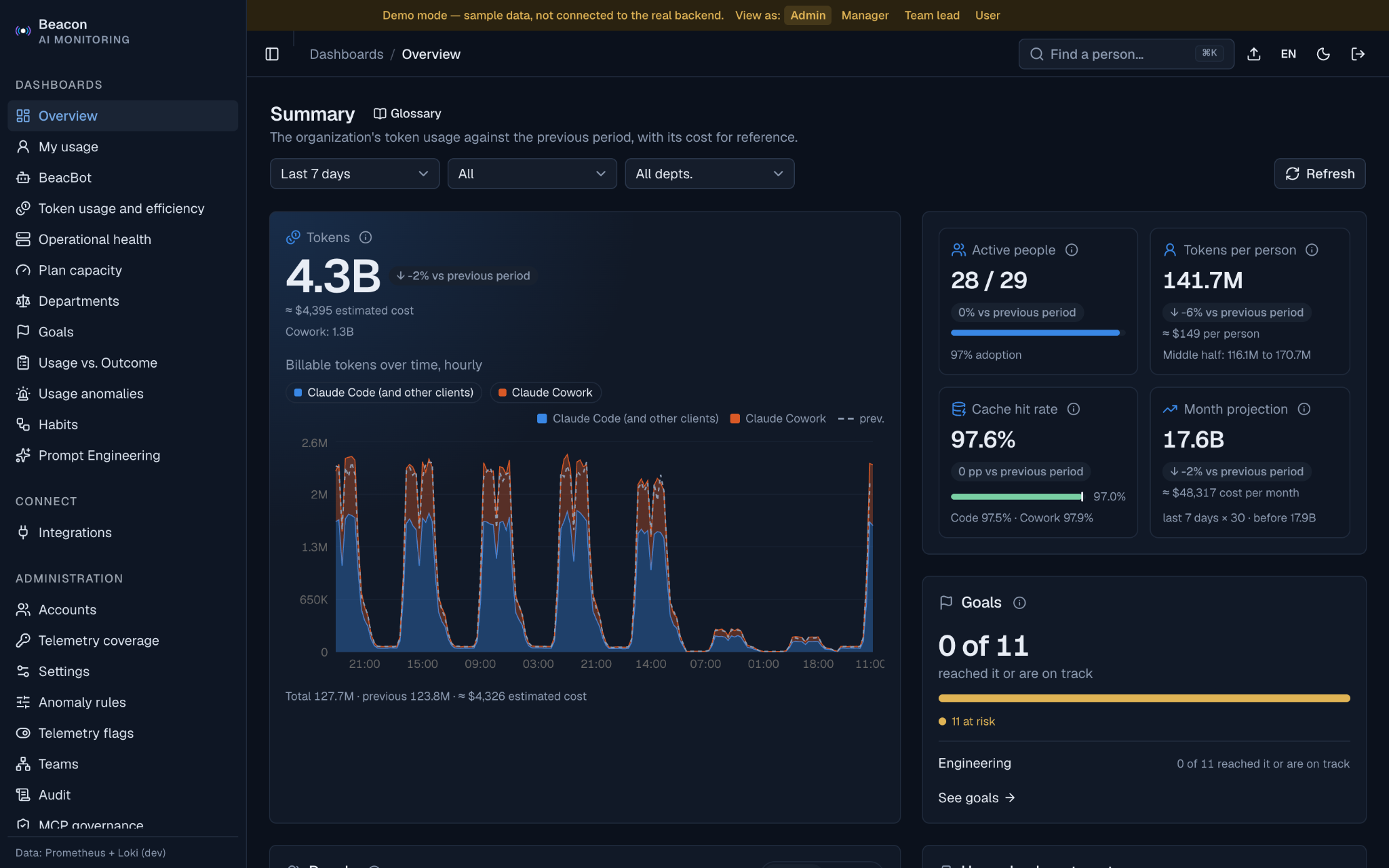
Beacon keeps billable usage apart from background caching automatically: the Overview charts billable tokens over time next to the total and shows the cache hit rate. Its Usage vs. Outcome view then puts estimated cost right next to what each person and team delivered:
- Real delivery metrics: Track commits, pull requests, lines added, tokens per commit, and estimated Cost per Commit.
- Cost × outcome map: Place each person by tokens and by commits plus pull requests, so heavy use with little outcome stands apart from heavy use that ships.
- Workflow and agent adoption: See each person's model mix (Opus, Sonnet, or Haiku) in Token usage and efficiency. In Habits, see how many people delegate to Subagents, adopt Skills, and run parallel sessions, plus which connectors, skills, and plugins the team extends Claude with.
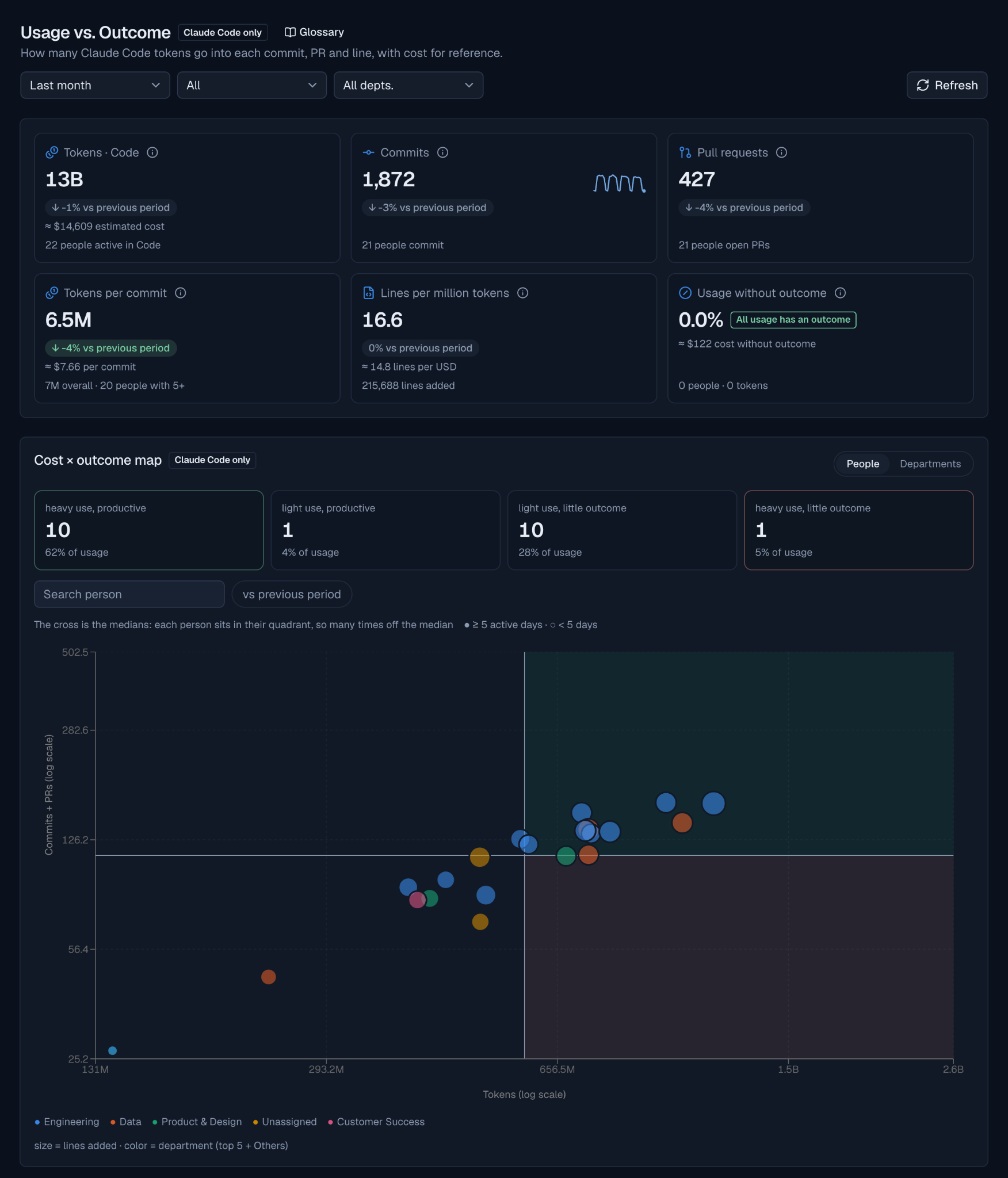
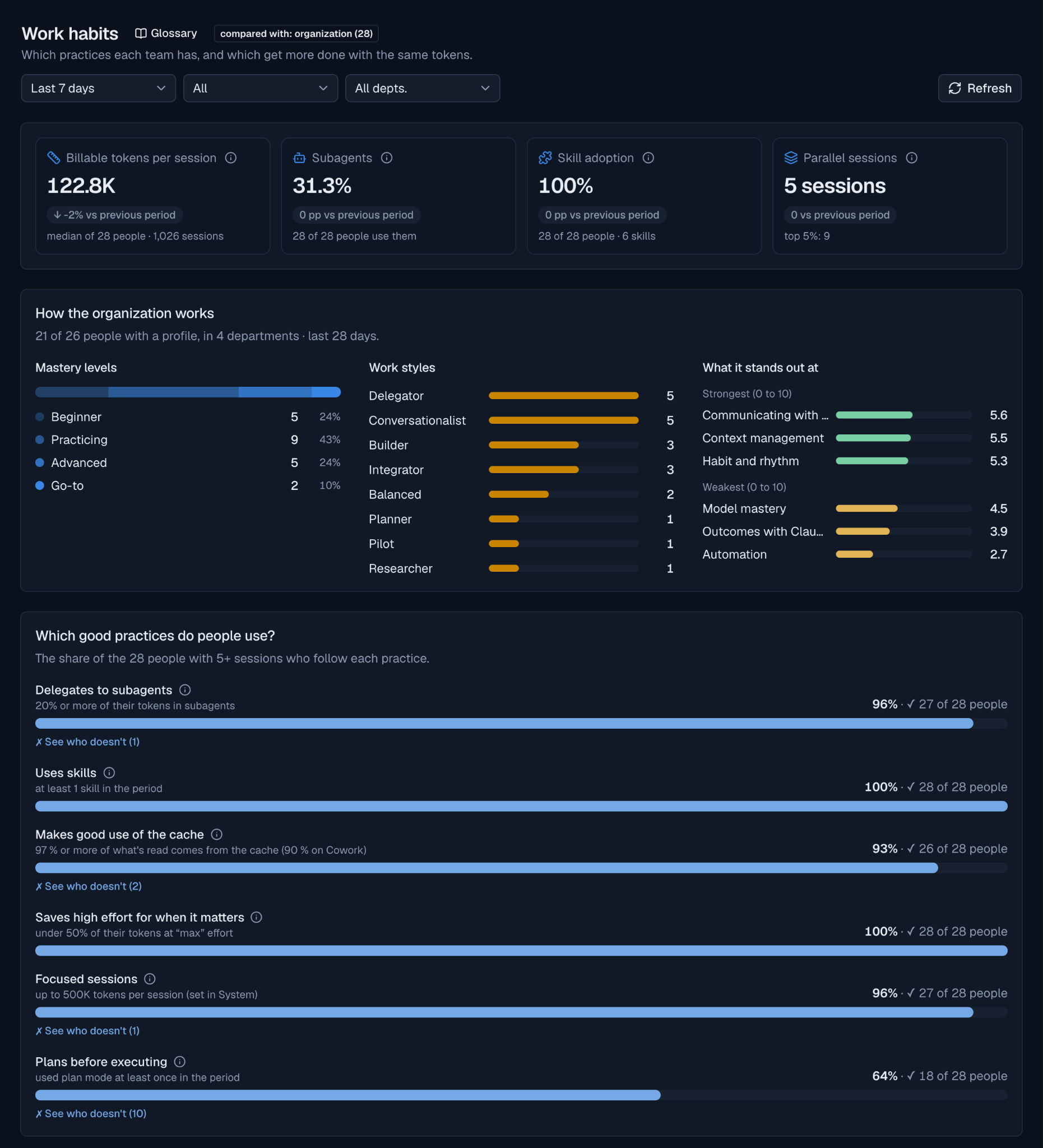
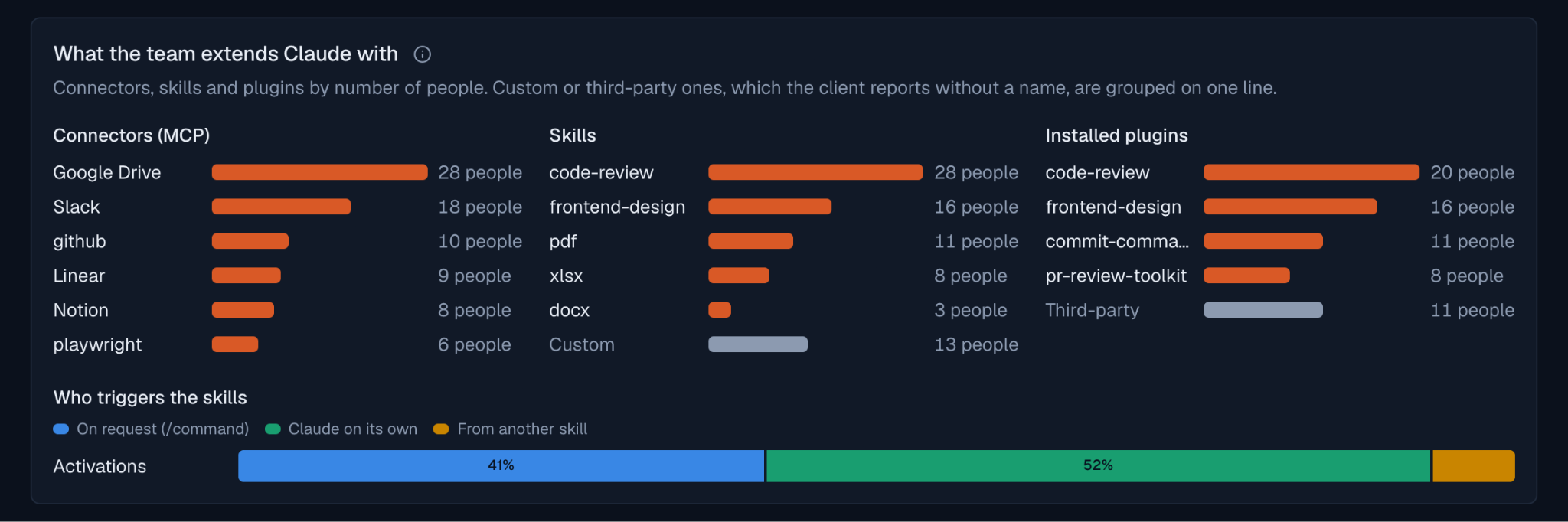
The purpose of these views is to help the whole team improve, not to evaluate developers by line counts. Instead of guessing whether high AI usage means high productivity, you can see which practices your team has and which get more done with the same tokens, and share them with everyone else.
2. Catching usage caps before momentum stalls
AI plans don't just have monthly budgets; they have short-term usage caps (often measured in 5-hour windows). When a developer hits that ceiling in the middle of a complex task, the tool slows down or locks them out completely.
Most developers won't open a support ticket to tell you they were blocked. They just lose their train of thought and wait. At the same time, managers have no easy way to know who needs a Premium seat and who is fine on a Standard seat.
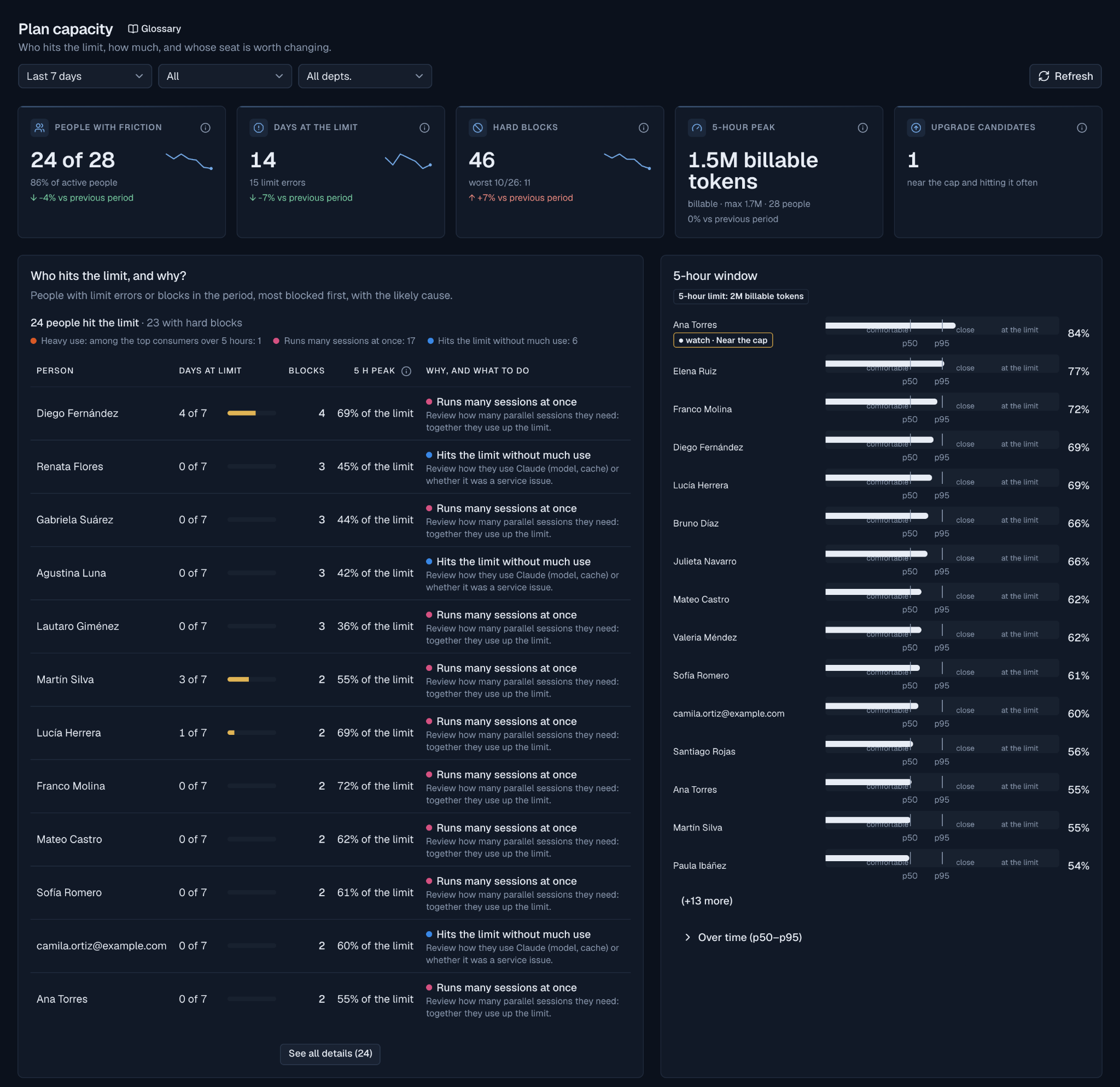
Beacon's Plan capacity view shows you how your team interacts with their plan boundaries:
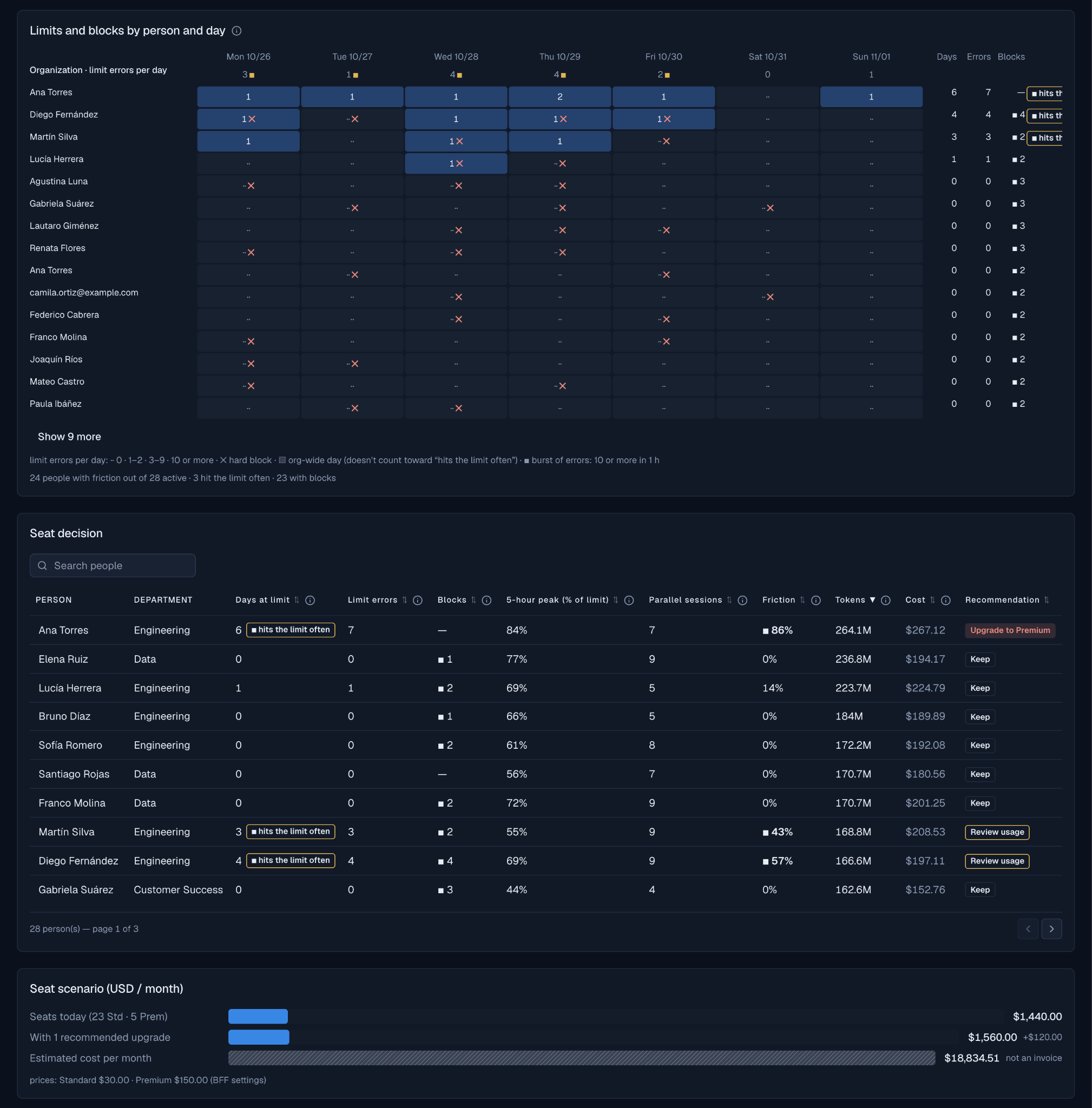
- Slowdowns vs. hard blocks: Beacon distinguishes between a brief rate limit and a Hard Block, where the AI tool fails completely and stops a developer from working, person by person and day by day.
- The likely cause per person: The most blocked people come first, each with a likely cause (heavy use, many sessions at once, or hitting the limit without much use) and what to do next.
- 5-hour peak per person: Each person's peak billable usage appears as a share of the limit, against comfortable, close, and at the limit zones.
- Right-sizing seats: The seat table recommends, person by person, whether to upgrade, keep the seat, or review usage, and a seat scenario shows what the recommended upgrades would cost per month.
3. Replacing technical logs with plain-English cases to review
Nobody wants to dig through four different charts every morning just to find out if something went wrong yesterday, and noisy Slack alerts quickly get muted.
Beacon's Usage anomalies screen brings the unusual cases together in one place, written in plain English, each with what happened, the evidence, and what to do:
- Expensive per token: People who pay more per million tokens than their peers, with the money at stake.
- Low cache use: People whose cache use falls below the target, with a concrete way to improve it.
- Spend jumps: A day or a week far above someone's usual spend, so you can confirm whether it was expected work or a mistake.
- Stopped using Claude: People who used Claude regularly and then stopped, so you can reassign idle licenses or check if someone is stuck.
Blocked team members and people who keep hitting their limit are covered in Plan capacity above, and outside accounts in Approved Domains & Access Control below.
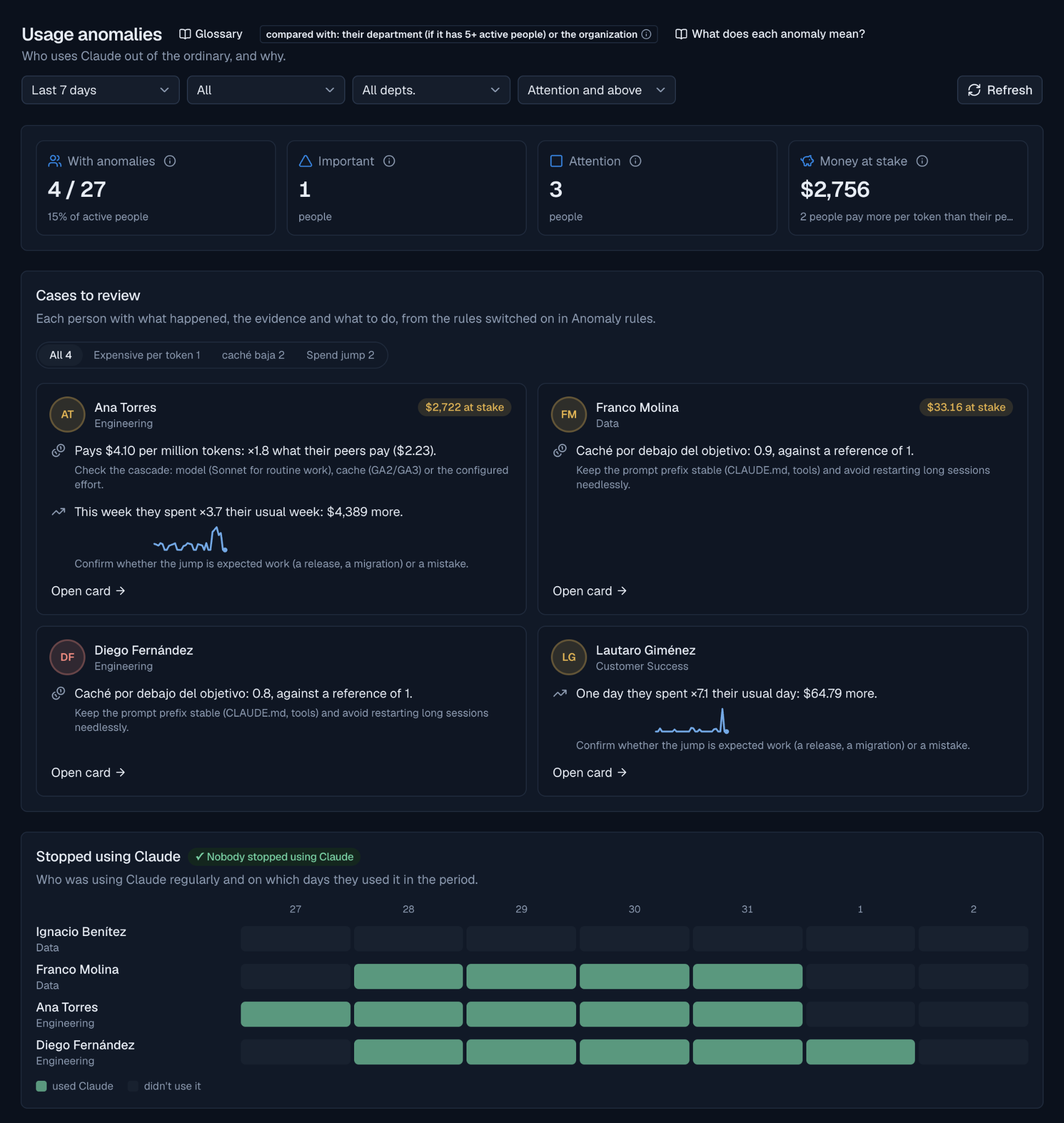
On Monday morning, a manager can see who is spending out of the ordinary, who stopped using their license, and what to do about each case.
What happened when we rolled out Beacon at Somnio
Screenshots with sample data show how the interface works, but the real test of any monitoring tool is whether it changes how a team operates.
We compared our own engineering team's Claude Code usage at Somnio Software across the four weeks before Beacon's first production release against our most recent 30 days in production. Instead of cutting AI spend, visibility helped us expand adoption, share the workflows of our most effective engineers, and get far more shipped work out of every dollar:
Beacon was not the only thing that changed in those weeks: the team grew and adopted new ways of working with AI. What Beacon changed is that we could see those shifts as they happened and spread the ones that worked.
Three takeaways stood out from our own rollout:
- Output scaled 3x faster than spend: While weekly AI spend grew 4x as nearly the entire team became active every week (from 20-35 up to 47-50 people), weekly pull requests grew 12x and weekly commits grew 26x.
- Smaller, cleaner changes at a fraction of the cost: Average lines added per commit dropped by 77% (from 1,035 down to 239 lines). Instead of giant, risky code dumps, developers shifted to smaller, incremental commits and pull requests, bringing our cost per commit down 85% (from $43 to $6.70) and cost per PR down 66% (from $101 to $34).
- Better token efficiency across the board: By spotting low cache hit rates and helping the team pick the right model mix and subagent workflows for each task, our cost per million tokens dropped 37% ($0.57 to $0.36) and lines added per dollar rose 49% (23.9 to 35.7).
Built for fast setup, team governance, and privacy by design
Beyond daily usage and delivery metrics, Beacon connects to your existing workflow in minutes and keeps growing organizations organized without adding administrative overhead:
- No-friction setup: Beacon reads standard OpenTelemetry events from Claude Code and agent workflows alongside repository activity (commits and pull requests), without changing how developers work in their terminal or IDE.
- Zero prompts or code recorded: Developers often hesitate to adopt monitoring tools out of fear that someone will read their prompts, while security teams worry about leaked secrets or passwords being stored in logs. Beacon tracks operational activity only and never records prompt text or source code.
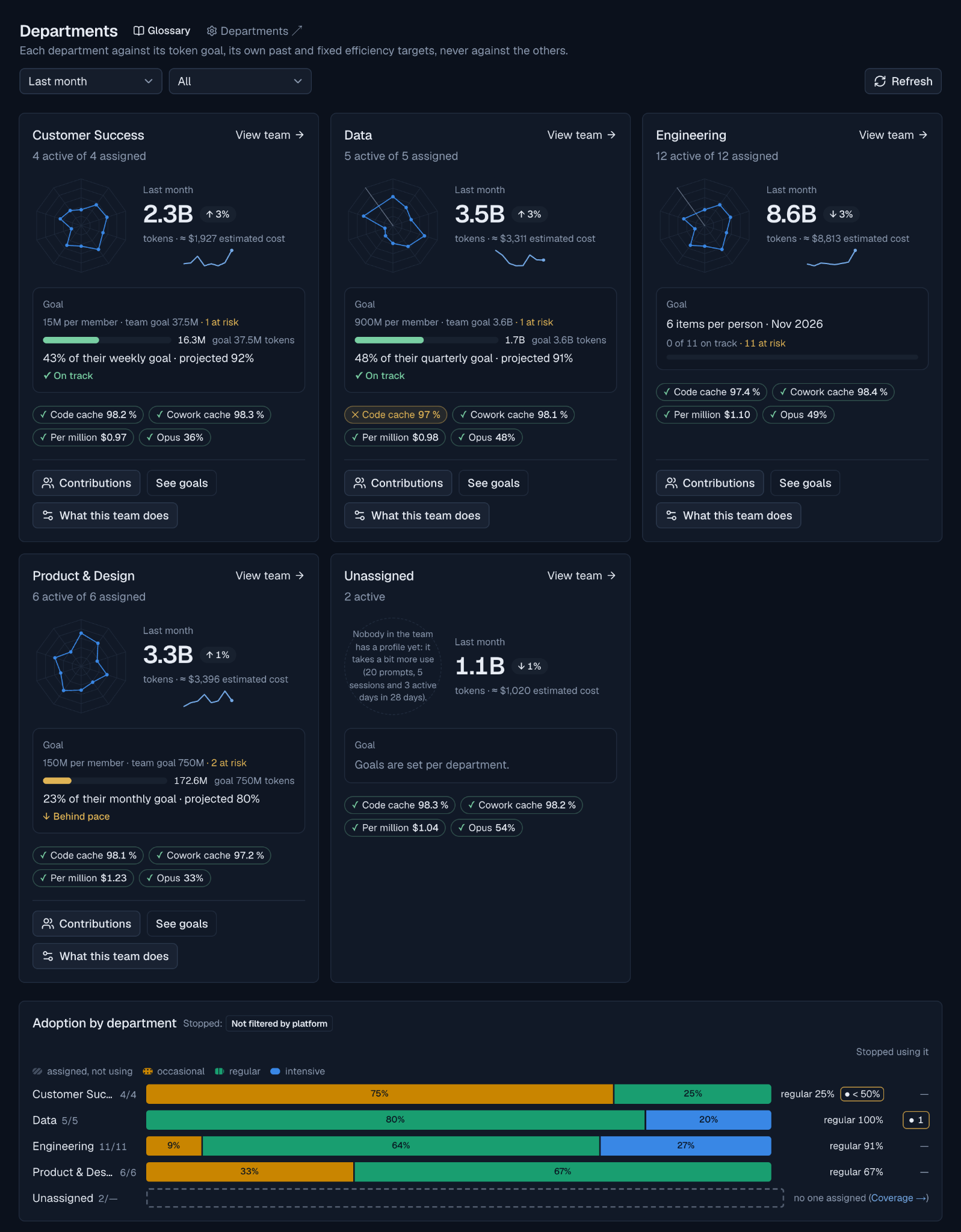
- Department views: Follow each department against its token goal, its own past, and fixed efficiency targets, with adoption shown per team. When someone changes squads, their reporting updates automatically.
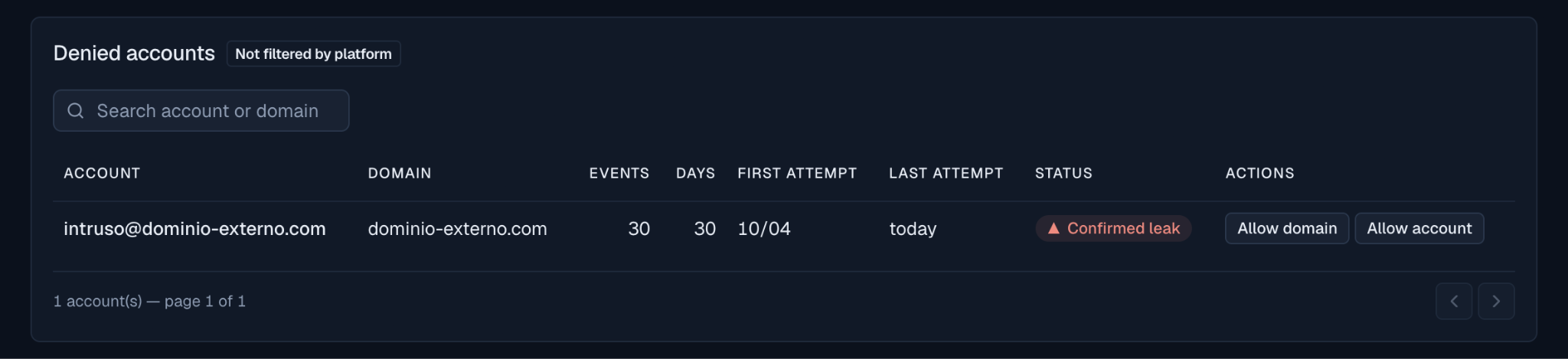
- Approved domains and access control: Manage approved company email domains and accounts from one place so unauthorized accounts are flagged and separated before they skew your company totals.

Why visibility separates AI demos from real products
Every company today can buy the same AI licenses and access the same models. Buying the tool is no longer a competitive advantage.
As we shared recently in our post on Leading AI Transformation: Why Companies Must Move Beyond Tools, the companies that pull ahead are the ones that adapt how they work, measure real adoption, and connect AI usage to real results. Handing out a hundred AI seats without visibility is just adding another software bill. Knowing how those tools help your people ship faster, where your team is hitting walls, and what every dollar of AI spend produces is how you build an AI-native organization.
When the monthly AI invoice arrives, it shouldn't trigger a guessing game. You should already know which seats to upgrade, which idle licenses to reassign, who got blocked by a usage cap, which outside accounts tried to log in, and how your AI spend translated into shipped work. We built Beacon to give our own teams and our partners those answers every day, long before the monthly bill lands.
Frequently asked questions about AI monitoring
What is AI monitoring for engineering teams?
AI monitoring is the practice of tracking how a team uses AI coding tools and agents: what they cost, where people get blocked by usage limits, which workflows they adopt, and what work comes out of them. Unlike server monitoring, it is built for the leaders who manage budgets and teams, not for system administrators.
How does Beacon track Claude Code usage?
Beacon reads the standard OpenTelemetry events that Claude Code and agent workflows already emit, and combines them with repository activity such as commits and pull requests. Setup takes minutes and does not change how developers work in their terminal or IDE.
What are Claude Code 5-hour usage limits?
Besides monthly budgets, Claude plans have short-term usage caps measured in 5-hour windows. When a developer reaches the cap in the middle of a task, the tool slows down or stops responding until the window resets. Beacon shows each person's 5-hour peak as a share of the limit, so managers know who needs a different seat.
Does Beacon record prompts or source code?
No. Beacon tracks operational activity only, such as tokens, estimated cost, sessions, limit errors, commits, and pull requests. It never records prompt text or source code, which helps developers trust the tool and keeps secrets and passwords out of the logs.
Ready to stop flying blind on your team's AI usage?
If you are scaling Claude Code, Claude Cowork, or AI agents across your organization and want clear visibility into costs, usage limits, and team outcomes, reach out to our team at Somnio Software to book a live demo of Beacon.