


Since Flutter 3.29, Dart code on iOS and Android runs on the application's main thread. There is no separate UI thread anymore. The change got nicknamed the Great Thread Merge, and most apps never noticed it.
It matters a lot more once your app has to generate sound in real time from a mathematical formula. Getting that right takes a trip through every concurrency tool Flutter gives you: the event loop, isolates, FFI and, finally, a small Rust core. This post walks through that path, and ends with a small demo app that puts all of it to the test.
What actually merged
Before 3.29, a Flutter app started with three important threads:
- the platform thread, the OS main thread, where Kotlin/Swift and the native APIs live;
- the UI thread, where the Dart VM runs your code (build, layout, everything you write);
- the raster thread, where Impeller (or Skia) turns the layer tree into pixels on the GPU.
The UI and platform threads never talked directly. Every call went through a platform channel: serialize the message, hop threads, deserialize, and always asynchronously.
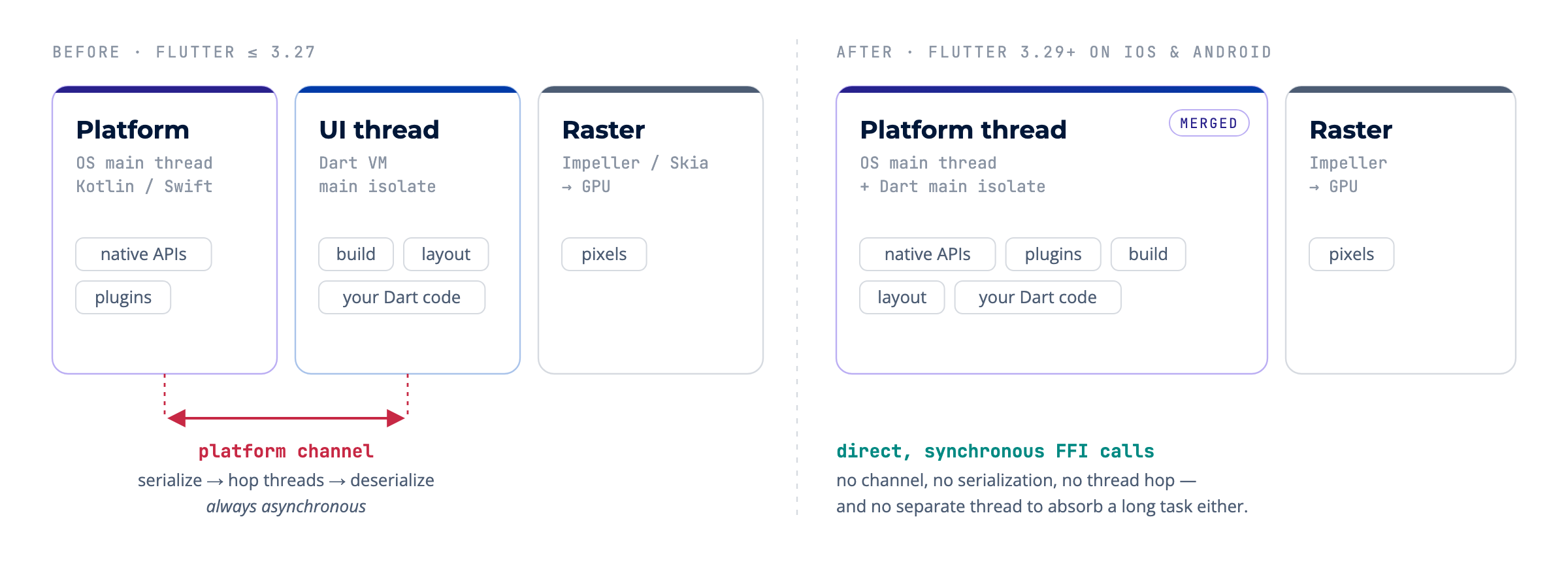
Flutter 3.29 merged the first two on iOS and Android. The Flutter team's motivation was practical: many native APIs must be called on the platform thread, and with two threads, Dart could not use FFI to call them directly. Each call needed an extra async hop, even when the actual work was trivial. Merging the threads allows synchronous calls to and from the platform without the overhead of serialization and message passing.
There is also an uncomfortable detail in the original proposal (flutter/flutter#150525): the separate UI thread never protected you as much as it seemed to. If work on it did not finish in time, it caused jank, just like blocking the platform thread would.
So the old rule still applies, with a bit more weight: don't block the thread Dart runs on. That thread is now the OS main thread.
Dart runs on one thread, and that's usually fine
Dart runs your code on a single event loop that processes events one at a time, in the order they arrive. Nothing interrupts anything else.
That sounds limiting until you remember that most "slow" work isn't Dart's work. When you await an HTTP request or a file read, the OS does the waiting, and the event loop is free to paint frames and handle taps until the result comes back. It's one cook who's good at delegating.
The limit appears when your own code is the slow part. A parseCatalog(json) that is fine with 50 items and painful with 50,000 doesn't delegate anything. It's your CPU, on your only thread. The standard answer is an isolate.

An isolate is another thread with its own heap and its own event loop. Isolates share no memory, so they can't race with each other. The trade-off is that they can only talk through messages, and messages get copied (or moved, with TransferableTypedData, which has its own rules).
For a one-off heavy computation, that cost doesn't matter. For a continuous stream of data, it starts to matter.
A sound app with a twist
Picture an easy request: an app that plays sounds. Use a Flutter audio package, ship the MP3s as assets, done.
Now add a twist: the sounds can't be files. They have to be generated from a mathematical formula, live, with parameters the user can change.
Math sounds heavy, so the textbook move is to put the generation in an isolate. The UI stays responsive, so the isolate does its job. But the audio has micro-cuts.
The problem isn't speed. It's timing. Audio hardware consumes samples in fixed-size buffers, and every buffer has a hard deadline. At 48 kHz with a 512-frame buffer, a new buffer is due every 10.67 ms, every time. If you miss one, nothing gets "dropped and repainted later" like a frame would. You hear a click.
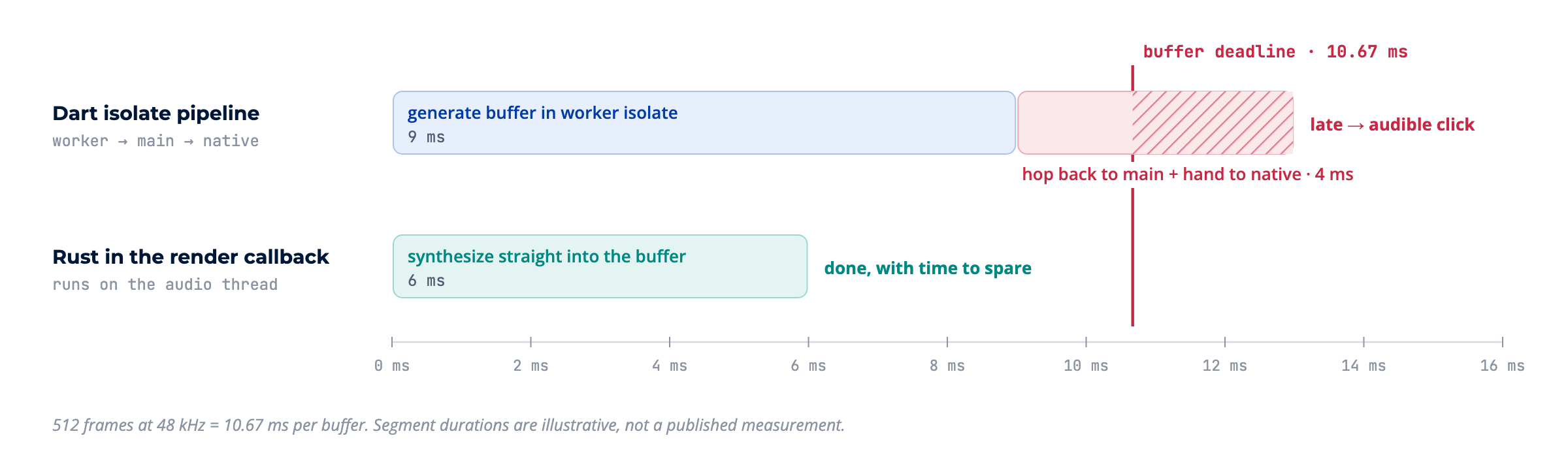
Why an isolate can't keep up
There are two reasons. The first is annoying; the second is fundamental.
1. Crossing isolates isn't free. Every buffer the worker isolate generates has to travel to the main isolate as a message, and then through a plugin into the native audio buffer. For one computation, that hop is noise. For a stream that must arrive every ~10 ms, each hop is another chance to be late.
2. The audio doesn't live on a Flutter thread at all. This is the reason that matters. On iOS, the audio render callback runs on a real-time priority thread created by CoreAudio (Android has the equivalent with AAudio). It isn't the platform thread, the raster thread, or any isolate's thread. The merge didn't touch it, because it was never Flutter's to begin with.
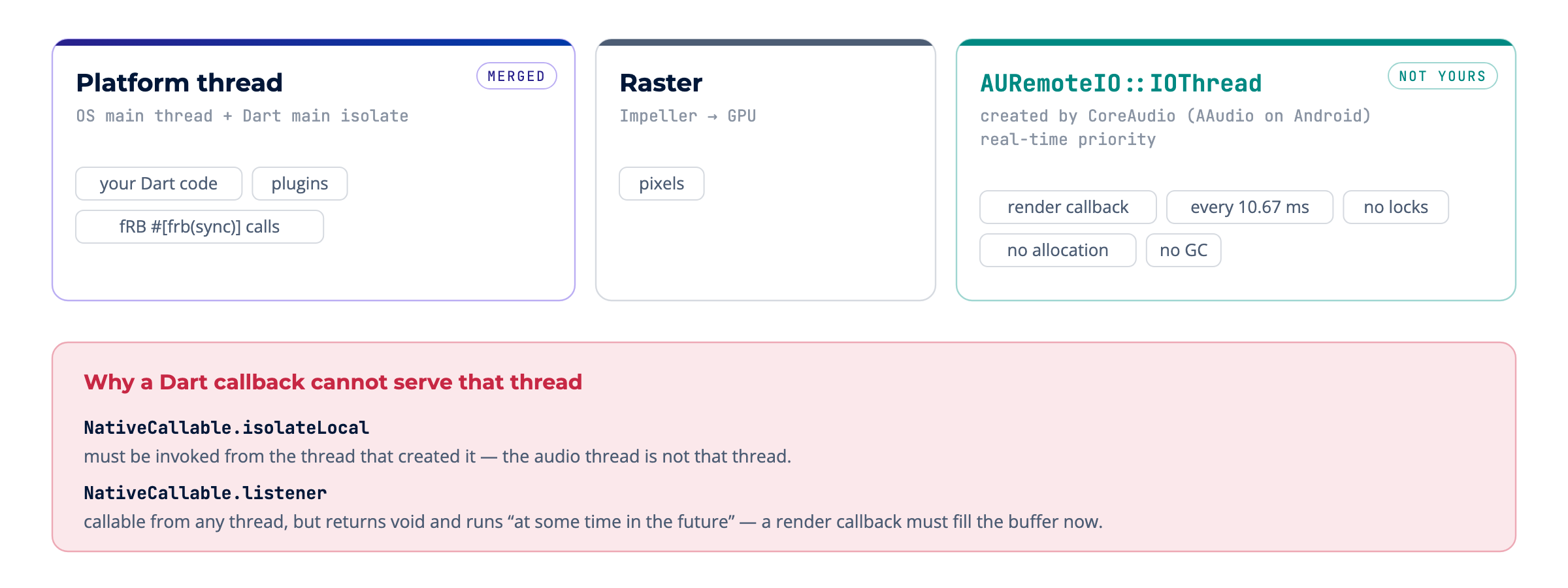
Couldn't a Dart callback just be registered there? Not really, and not because it's a bad idea. There's no API for it:
NativeCallable.isolateLocalmust be invoked from the same thread that created it, and the audio thread isn't that thread.NativeCallable.listenercan be invoked from any thread, but only supports functions returningvoid, and the callback runs at some time in the future.
A render callback needs to fill the buffer, and fill it now. One of Dart's options runs on the wrong thread, and the other can't return anything.
Even with an API, Apple's guidance for render callbacks is strict: don't take locks, don't allocate memory, don't touch the file system or network. A garbage-collected runtime can't promise a microsecond ceiling.
Enter Rust (just for the part that needs it)
To be clear: this doesn't mean rewriting the app in Rust. Everything users see stays regular Flutter. Rust owns exactly one job, generating and playing audio at a low level, because that's where it pays off:
- predictable performance: no garbage collector on the critical path;
- it can register the render callback on the native audio thread directly;
- one engine for every platform, which is the same promise that made us pick Flutter.
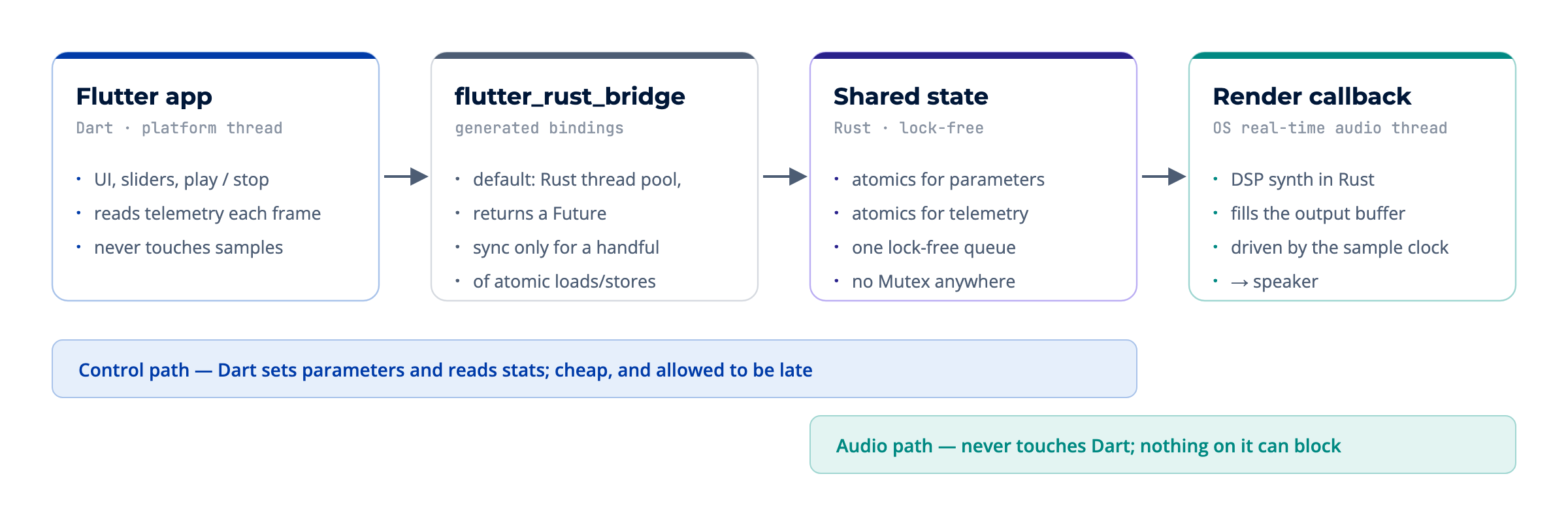
The architecture separates two paths that used to be one:
- The control path: Dart sets parameters (frequency, load, play/stop) and reads telemetry. It's cheap, and if it's a frame late, nobody hears it.
- The audio path: the render callback reads those parameters and synthesizes samples straight into the output buffer. It never touches Dart, and nothing on it can block.
The two paths share only atomics and one lock-free queue. There's no Mutex anywhere near the audio thread, because a lock there can wait on a thread you don't control, and a missed deadline is an audible click.
The demo app uses cpal as the low-level audio layer. This is its render callback, trimmed:
Connecting it to Flutter: flutter_rust_bridge
Hand-writing FFI bindings for this is possible, but flutter_rust_bridge (a Flutter Favorite) generates them for you. More importantly, it handles concurrency for you: generated functions are asynchronous in Dart by default, and the Rust side runs on a thread pool.
Here's where the Great Thread Merge actually matters for this setup. #[frb(sync)] runs the Rust function on the calling thread, and since 3.29, that thread is the OS main thread. A slow function marked sync no longer blocks "just the UI". It blocks the whole app's main thread.
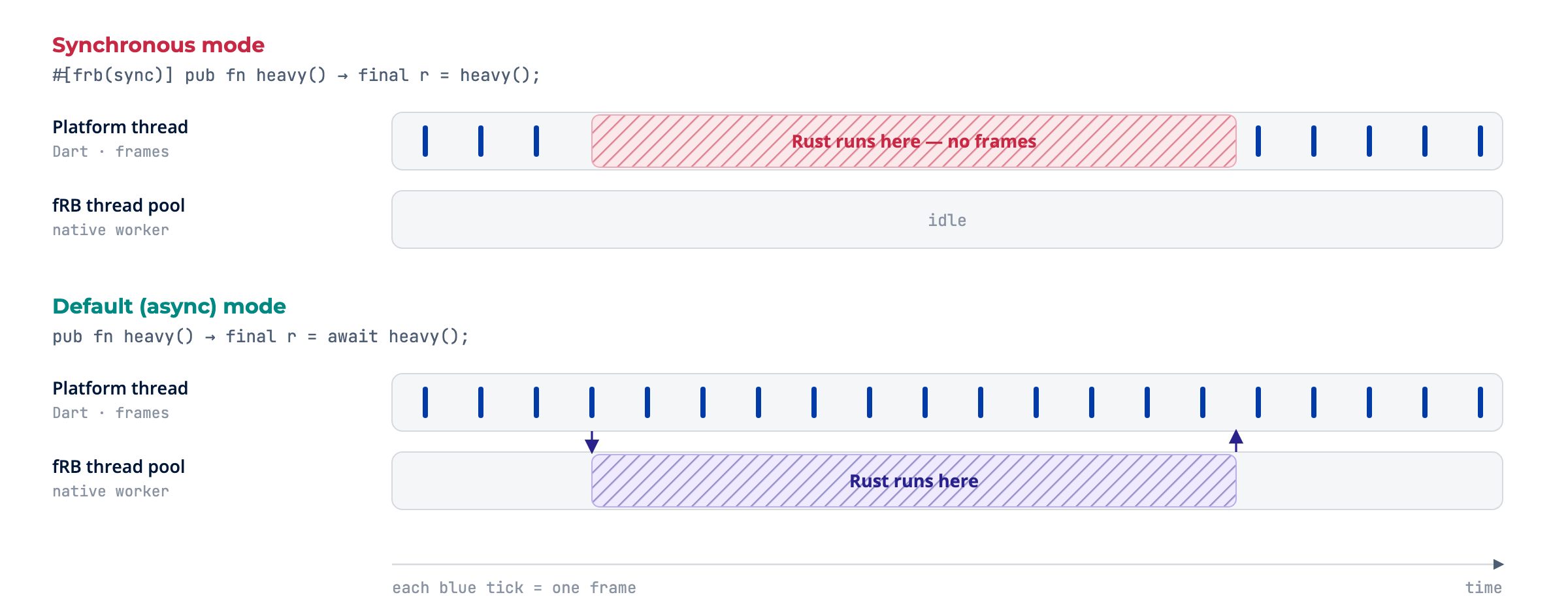
The rule we follow is simple: sync only for things that are trivially fast (a few atomic loads or stores). Everything else uses the default async mode. If you hand-roll FFI instead, you don't get that async default for free. You have to build it yourself, and it's easy to forget. That's usually where the jank comes from.
Seeing it: the demo app
To put this to the test, we built a small demo app. It plays the same FM tone with the same adjustable synthesis load (a chain of FM operators per sample, so the cost grows with the slider), and lets you switch only where the work runs:
- Rust: generated inside the render callback, on the OS audio thread.
- Main isolate: generated in Dart on the main isolate, fed to the platform through a PCM plugin.
- Worker isolate: generated in Dart on a long-lived worker isolate, sent back to the main isolate, then fed to the plugin.
The card at the top answers one question, "is the tone arriving on time right now?", and the blue wave is repainted every frame. If the wave freezes, the UI thread is blocked. (The app's UI is in Spanish because it was built for a talk; SIN DELAY = on time, HAY DELAY = late, Cortes = dropouts.)
Dart on the main isolate: the UI and the audio both suffer
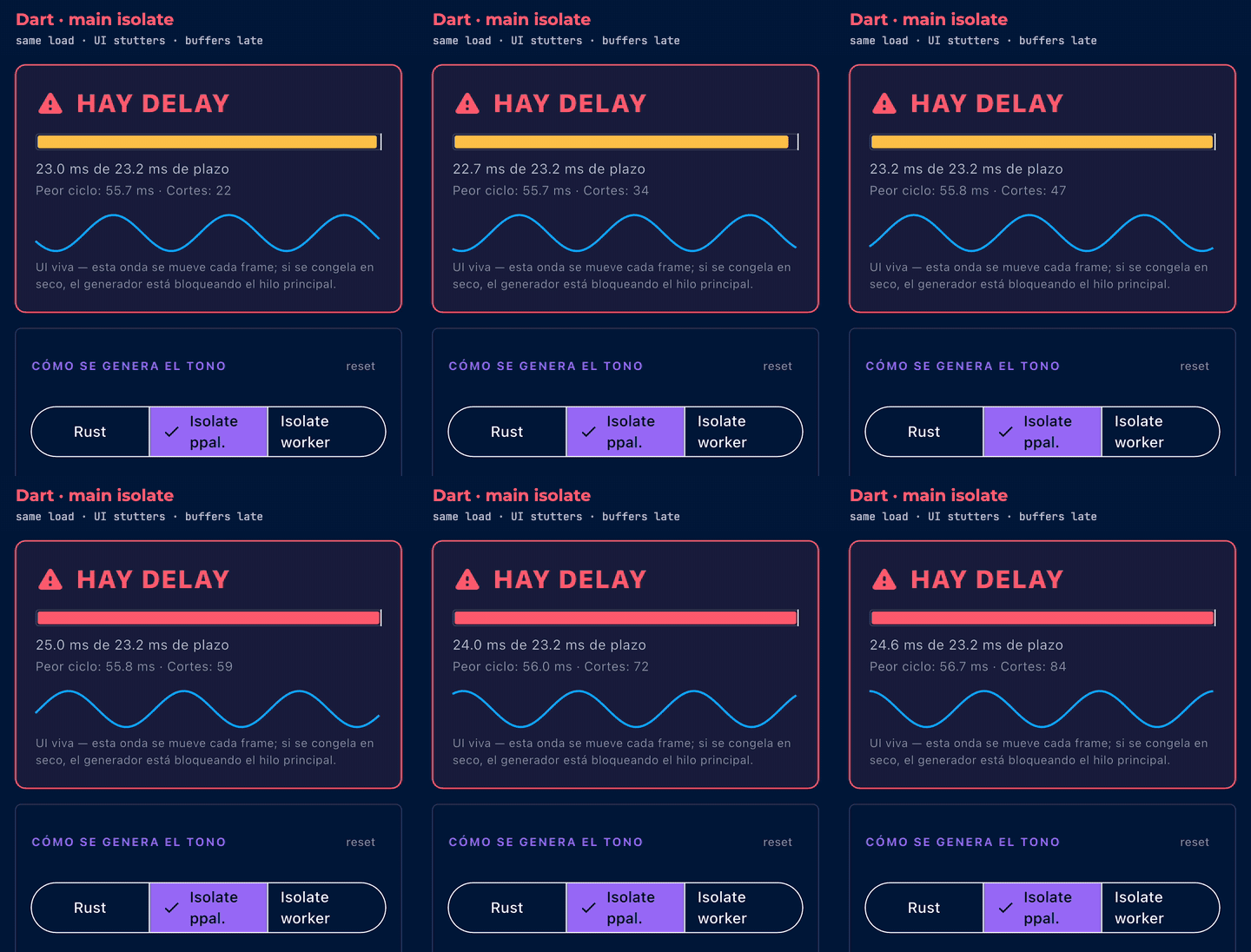
Synthesis and painting compete for the same thread. Each chunk takes about as long as its whole deadline, so buffers arrive late, and the wave stutters because frames only get painted in the gaps. In our recording, the wave failed to move in more than half of the sampled frames, with stalls up to ~50 ms, and underruns kept climbing.
Dart on a worker isolate: the UI recovers, the audio doesn't
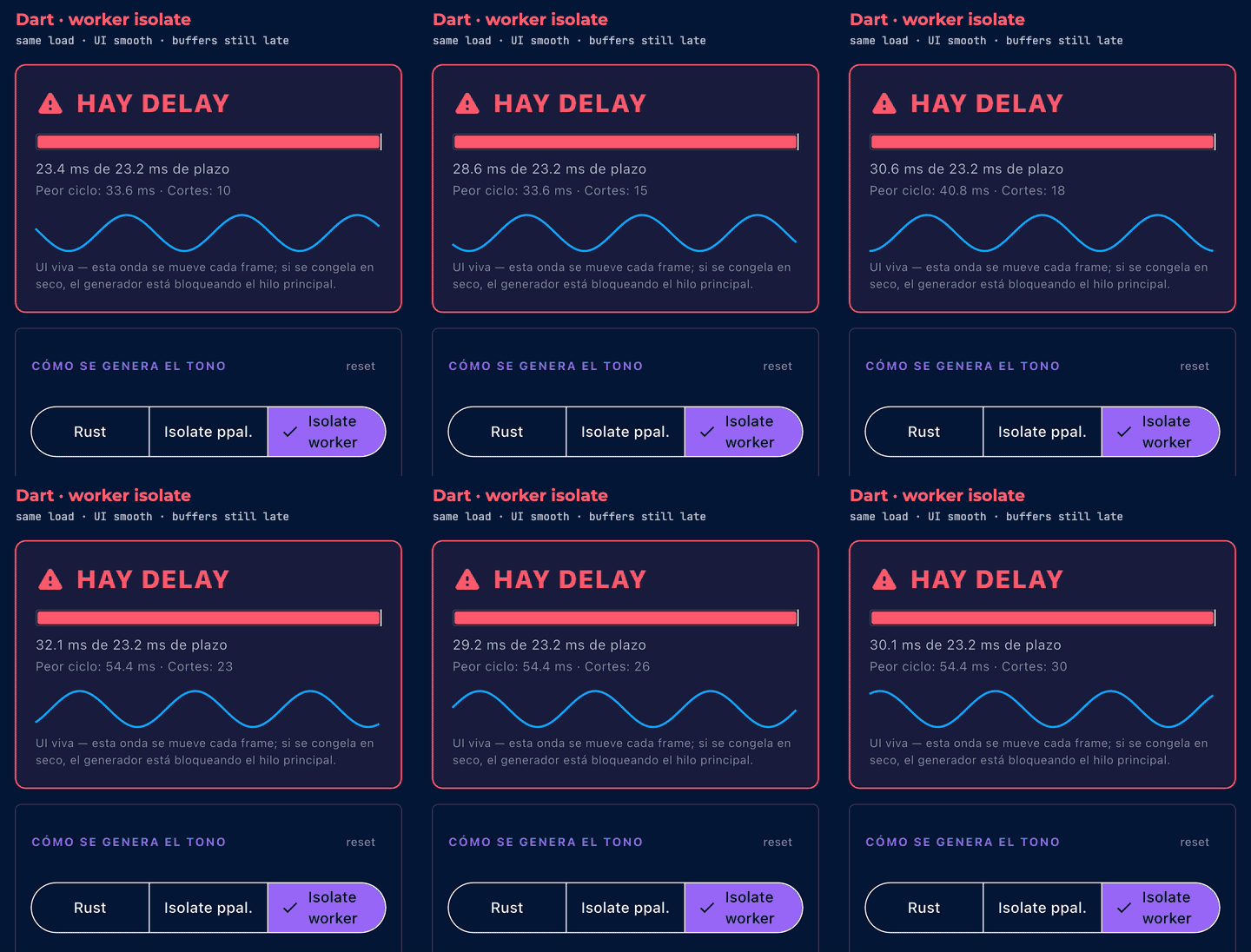
This is the trap. The isolate does its job: the main thread is free, so the wave is smooth again. But every buffer still has to make the round trip (worker → main isolate → plugin → native buffer) before the deadline, and it doesn't. The UI looks fine and the audio still clicks. Moving work off the main thread fixes the UI. It doesn't fix the audio deadline.
Rust on the audio thread: both on time
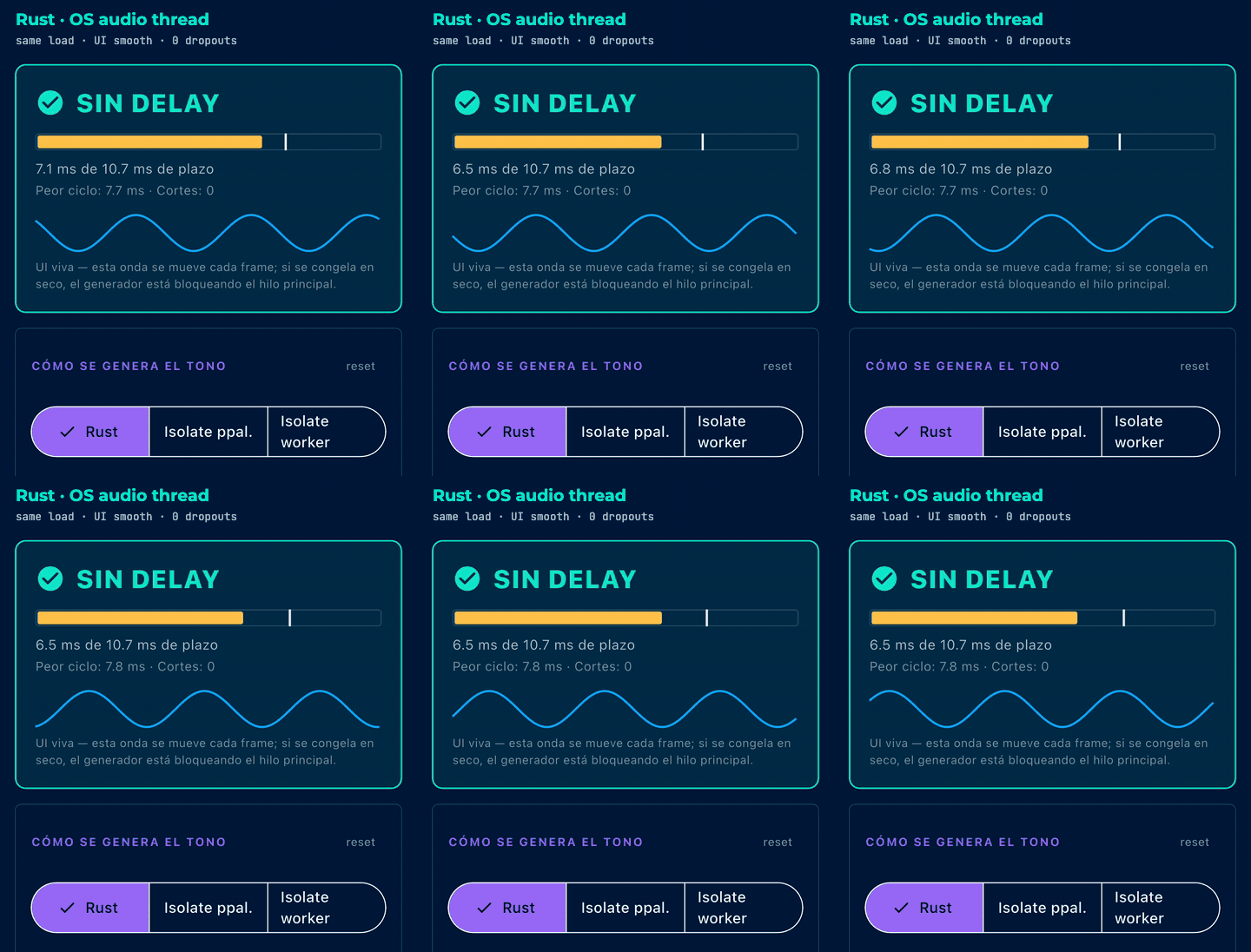
Same load, same tone. The synthesis now runs where the audio is consumed, so there's no hop and nothing to wait for. Rust used about 7 ms of a 10.7 ms buffer with zero dropouts, and the main thread only reads a few atomics per frame, so the wave stays smooth.
Side by side
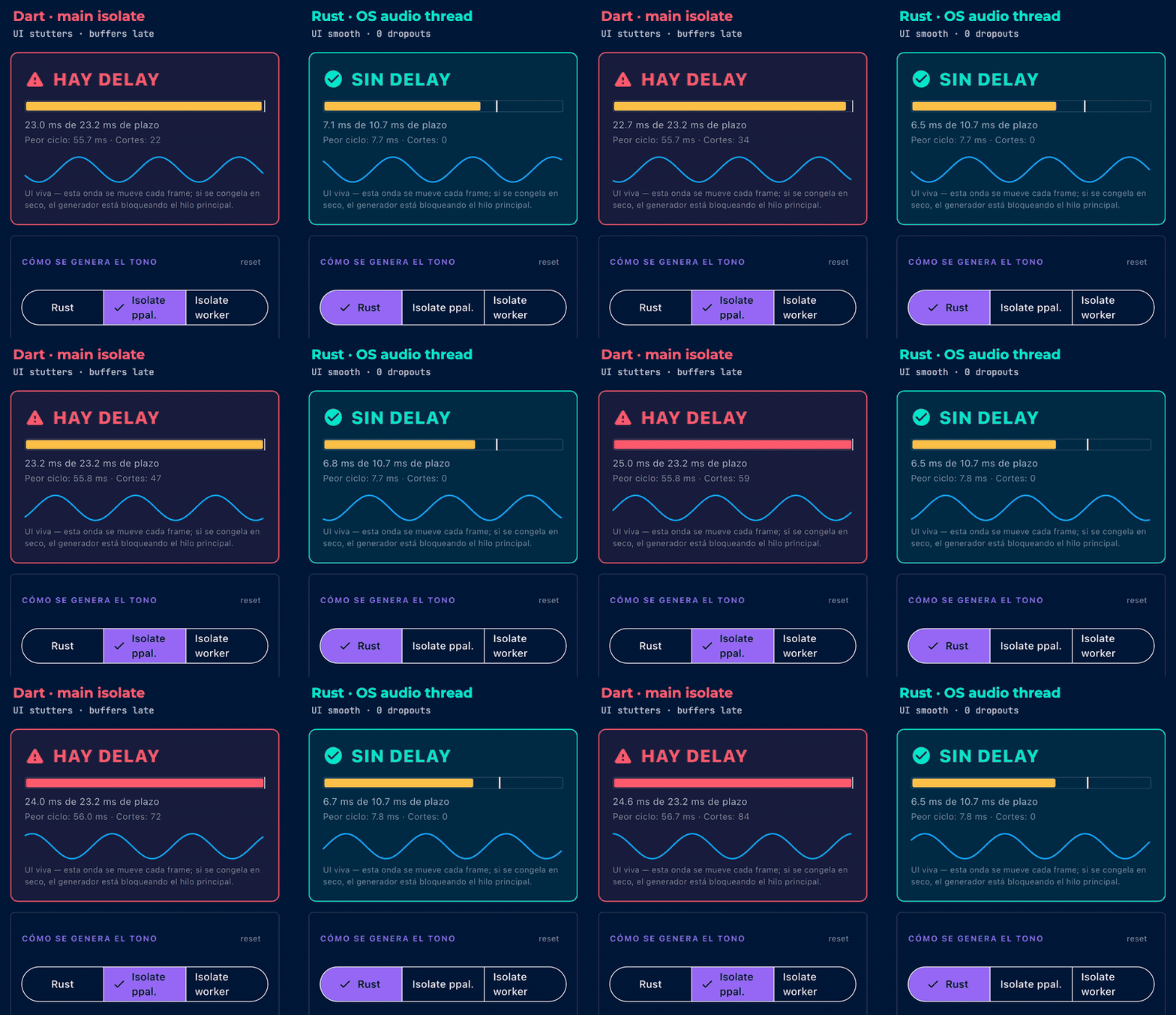
Put next to each other, the two runs sum up the whole post. The blue wave on the left stutters because synthesis and painting share one thread, and its buffers miss their deadline. On the right, the same work runs on the thread that consumes the audio, so both the UI and the sound stay on time.
| Engine (same load) | Buffer deadline | Typical cycle | Dropouts | UI wave |
|---|---|---|---|---|
| Dart · main isolate | 23.2 ms | ≈ 23 ms (worst ≈ 56 ms) | keep climbing | stutters |
| Dart · worker isolate | 23.2 ms | ≈ 30 ms (worst ≈ 76 ms) | dozens | smooth |
| Rust · audio thread | 10.7 ms | ≈ 7 ms (worst ≈ 8 ms) | 0 | smooth |
How this was measured: iPhone 15 Pro simulator (iOS 17.5), Flutter 3.47 in debug mode, Rust compiled with optimizations (opt-level = 3), synthesis load set to 1,110 FM operators per sample. Two caveats, so you can read the numbers fairly. First, Dart in debug mode runs on the JIT, so the raw speed gap is larger than it would be in a release build. Second, the Dart engines actually got the easier deadline (1,024 frames at 44.1 kHz versus 512 at 48 kHz). The comparison isn't meant to prove "Rust is faster than Dart". It shows that where the work runs decides whether it can meet the deadline at all.
Takeaways
- The Great Thread Merge mostly doesn't change your code. It does raise the cost of blocking: the thread Dart runs on is now the OS main thread.
- The event loop handles waiting; isolates handle heavy CPU work. Both are the right first tools, and for most apps they're the only tools you need.
- Isolates fix the UI, not deadlines. If your output has to meet a hard real-time deadline (audio, some sensor or video pipelines), the hop between isolates and into native code is part of the problem.
- Some threads aren't yours. The real-time audio thread is created by the OS, and Dart has no API to fill a buffer on it synchronously. That's the point where a native core earns its place.
- Rust doesn't have to take over the app. Keep Flutter for everything it's good at. Put only the real-time core in Rust, share state through atomics and lock-free queues, and let
flutter_rust_bridgehandle the bridge. - Use
#[frb(sync)]only for trivially fast calls. After 3.29, a slow sync call blocks the main thread, not just the UI.
The heavy work doesn't get done later. It gets done somewhere else.
Sources
- Flutter blog, What's new in Flutter 3.29 (the thread merge and synchronous platform calls)
- Flutter docs, Merged threads on macOS and Windows (why the split design blocked FFI) and Performance best practices
- flutter/flutter#150525, the original merge proposal
- Dart docs, Concurrency and Isolates; API docs for
TransferableTypedDataandNativeCallable - Apple, Audio Unit Hosting Fundamentals (real-time render callbacks and their constraints)
- flutter_rust_bridge, Concurrency guide and pub.dev page
If you’re searching for a trusted software development partner, look no further. Contact us today to learn how we can help you turn your vision into reality with our tailored, high-quality solutions.


