
A2UI lets an AI agent answer with native Flutter screens instead of text. How it works, and where the agent's choices end and your code takes over.
Every mobile team has had the same wish at some point: change what a user sees today, custom-made for that user, without shipping a release and waiting days for store review. Feature flags and remote config get you part of the way. Server-Driven UI gets you further. But someone still has to design every screen in advance.
In November 2026, Google and the Flutter team released A2UI 1.0 and a2ui_flutter, the package formerly known as genui. Somnio was one of the launch partners, with an open-source investing companion featured in the official Flutter announcement.
We already told the story of that demo, from the use cases we picked to what we showed live on stage, in A2UI 1.0 at Flutter Create: Somnio's fintech agent demo. This post zooms out: it explains the concepts behind it, so you can apply them to your own app.
Building that demo taught us one thing above all – generative UI looks like magic from the outside, but most of what makes it work is plain, deterministic code. This post explains what A2UI is, how it compares to Server-Driven UI, what a2ui_flutter gives you out of the box, and where exactly the line sits between what the agent decides and what your code controls.
What is A2UI (and what it isn't)
A2UI (Agent-to-User Interface) is an open protocol that lets an AI agent answer with interactive screens instead of text. The agent does not send code or pixels. It sends a JSON description of which components to show and what data they hold, and each app renders that description with its own native widgets.
Version 1.0 is the first stable release. It already has renderers for React, Angular, Lit, Flutter and SwiftUI, agent SDKs for Python, TypeScript and Dart, and companies like Atlassian, Bloomberg and ByteDance building on it, as you can read in the Google Developers Blog. That is why we see it becoming the industry standard for agent-driven UI, the same way MCP became the standard for connecting agents to tools.
Generative AI: the part that reasons
The "generative" part is the agent – an LLM that reads the user's request and context and decides what the best interface for that moment is. Ask an investing app "What moved my portfolio today?" and a text-only agent writes a paragraph full of numbers. An A2UI agent answers with a waterfall chart that breaks the change down by asset.

Server-Driven UI: the part that renders
If you have worked with Server-Driven UI (SDUI), the rendering side will feel familiar. The app ships a set of components, the server sends JSON, and the app builds the screen at runtime. No store release needed.
The short version: A2UI is Server-Driven UI where the server got a brain. The mechanics you already trust (a fixed component set, JSON, native rendering) stay the same. What changes is who writes the JSON.
Where the agent stops and your code starts
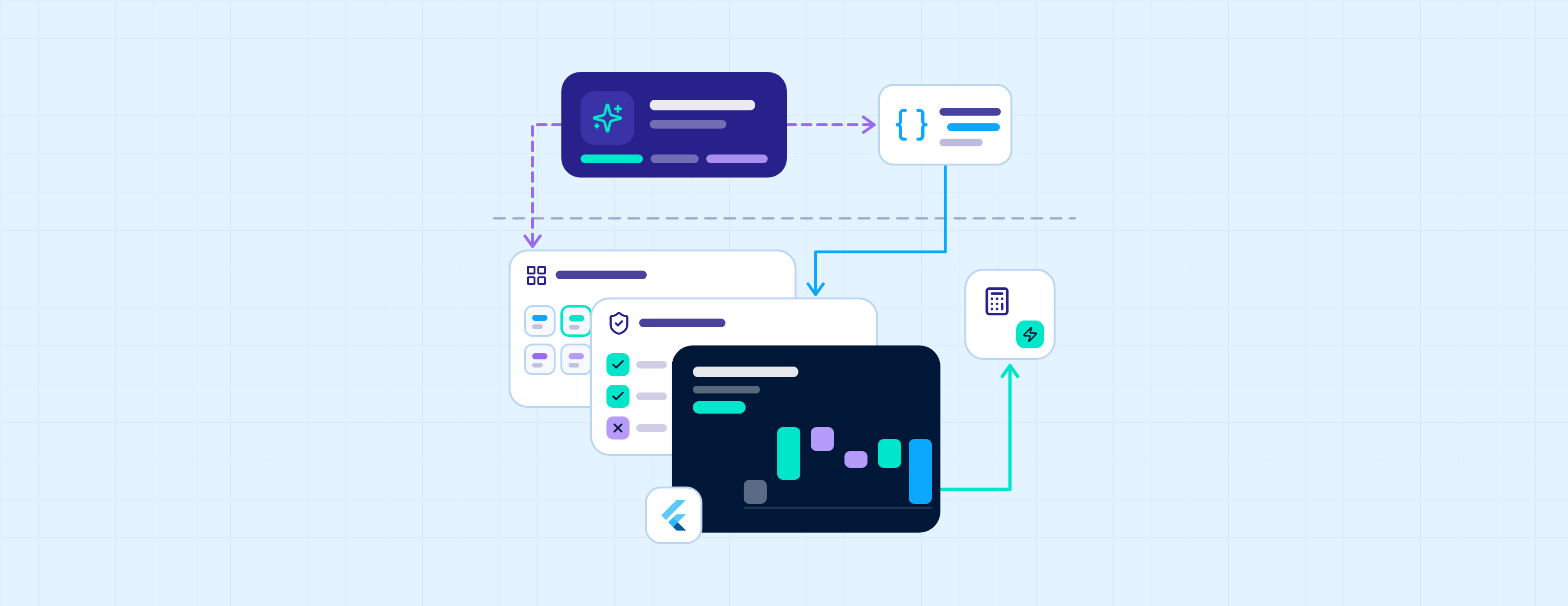
The most useful mental model we found: the agent only makes choices, and everything it chooses from is deterministic code you own.

Above the line, the agent reads the request and decides which components to show and how to arrange them. Below the line, everything is predictable:
- The catalog defines what can exist. The agent receives its schema in the prompt, so it knows the rules before it writes anything.
- Validation checks every message before a widget is built. In 1.0,
allowedParentsandallowedChildrenstop the agent from, say, putting a data table inside a button. Invalid UI is rejected with an error the agent can see (Flutter blog). - Flutter widgets are your own design system. The agent never controls colors, fonts or spacing.
- Backend tools calculate every number. In our demo, the model never does arithmetic: it receives pre-formatted values and only decides where to place them.
The most interesting arrow is the one at the bottom. With callAgentFunction, new in 1.0, a widget can call a backend function directly. When a user adjusts a stepper in our order-drafting card, the backend recalculates weights, fees and remaining cash and updates the same card in under a second, without a new LLM turn (Flutter blog).
In code, the call goes through the surface. This helper asks the agent to re-render a view with new options, for example a different time range:
If you want to see this rule applied end to end, our Flutter Create post walks through how the order ticket, the attribution waterfall and the tax-lot table use it.
a2ui_flutter in practice
a2ui_flutter is the Flutter renderer for A2UI, published by labs.flutter.dev. It works with two sibling packages that together replace the old genui package:
What comes out of the box
The package ships the v1.0 basic catalog, built with Material widgets. Calling basicCatalog() gives you all of it:
- Layout: Row, Column, List, Card, Tabs, Modal, Divider
- Content: Text, Image, Icon, Video, AudioPlayer
- Input: Button, TextField, CheckBox, ChoicePicker, Slider, DateTimeInput
That is enough for forms, confirmations and simple cards. To see every component rendered, the a2ui_explorer gallery app steps through the examples next to each surface's data model.
Rendering a surface
A MessageProcessor (from a2ui_core) applies the agent's messages, and an A2uiSurface widget renders the result. The agent describes the UI as a flat list of components, where the one with id root is the top of the tree.
Here is a real message from our investing demo, trimmed for readability (the real message also carries the sparkline points in spark). In 1.0, a single createSurface can carry both the components and the data model. This surface has one component, PortfolioSummary, bound by path to /root in the data model:

Notice that every figure comes twice: a raw amount for anything that needs to calculate, and a display string formatted by the backend. The client only ever shows display.
On the Flutter side, a MessageProcessor applies the agent's messages and an A2uiSurface widget draws each surface. This small class wires them together. FinanceAgent stands for whatever connection your app uses to talk to its backend:
And in the widget tree, each surface the agent creates becomes an A2uiSurface:
Custom components: where your design system comes in
The basic catalog will not draw a portfolio attribution chart. For that you register your own components. A custom component is two things: a schema that tells the agent which properties exist, and a builder that turns those properties into a widget. In 1.0, a surface can mix several catalogs, so your components live in a catalog of their own, next to the basic one.
In our demo, every finance component follows the same pattern: a single property, data, bound to its view in the data model. The builder resolves that binding and hands the payload to a plain widget:
Then the components go into a catalog. Its id is the catalogId the agent sends when it creates a surface:
A few things worth noticing:
- The widget doesn't know A2UI exists.
AttributionWaterfallCardis a regular widget from the design system: it can be tested, reused and previewed like any other. Only the component definition talks to the protocol. - The schema is tiny on purpose. One binding per component leaves the agent very little to get wrong. Anything else fails validation before a widget is built.
- Money arrives as text. Every figure in the payload is a pre-formatted
displaystring. The builder never formats or calculates a number.
Three myths about generative UI
"The AI writes UI code." It doesn't. The agent sends JSON that references components you already shipped. No Dart, no HTML, no code executed on the device. If a component is not in your catalog, it cannot appear.
"The model sees all your data." It doesn't have to. A2UI binds data on the server, so sensitive values can stay out of the model's context entirely (Google Developers Blog). In our demo, every number is calculated by backend tools and arrives pre-formatted. The model decides where a value goes, never what the value is.
"You lose control of what the user sees." You keep more than you'd think. The catalog defines what can exist, the schema defines what each component accepts, allowedParents and allowedChildren define what can go inside what, and the client validates everything before building a widget. Even the look stays yours because the components are your design system's widgets.
One caveat that is not a myth: treat agents you don't control as untrusted. The a2ui_flutter docs warn that a malicious agent could imitate a legitimate interface or send layouts heavy enough to slow the app down.
When not to use it
The Flutter team says it plainly: generative UI is not meant to replace your deterministic screens (Flutter blog). When we built our Fintech demo, we started with eight ideas and kept three. Our filter was simple: would a static screen do this just as well?
Skip A2UI when:
- The flow is always the same. Login, onboarding, checkout. A fixed screen is faster, cheaper and easier to test.
- Every millisecond counts. A new agent turn takes seconds. Interactions inside a generated view can use
callAgentFunctioninstead, but the first render still waits for the model. - The answer is a single value. "What's my balance?" doesn't need a generated card.
- You can't afford the cost. Every generated view is model tokens. Know your volume before you commit.
Use it when the right interface depends on what the user just asked, and you can't predict every combination in advance.
Conclusion
A2UI makes the old promise of Server-Driven UI more ambitious: interfaces built for each user at the moment they need them, without a store release.
But the reason it works in production is not the model. It is everything around it: a catalog you own, schemas that act as contracts, client-side validation, and backend functions that do the math.
The agent chooses. Your code decides. If you design for that split from day one, generative UI stops being a demo trick and becomes a feature you can ship.
Our investing companion is open source and live as part of Google's A2UI partner showcase. For the product side of the demo, including the use cases and what we learned presenting it, read A2UI 1.0 at Flutter Create: Somnio's fintech agent demo.
FAQ
What is A2UI?
A2UI (Agent-to-User Interface) is an open protocol for generative UI: it lets an AI agent answer with interactive screens instead of text. The agent sends a JSON description of components and data, and each app renders it with its own native widgets. Version 1.0 has renderers for Flutter, React, Angular, Lit and SwiftUI.
How is A2UI different from Server-Driven UI?
Both send JSON that the app renders with native widgets, with no store release needed. The difference is who decides the layout. In Server-Driven UI, a developer designs every screen in advance. In A2UI, the agent picks components from your registered catalog at runtime, per user and request. A2UI is also an open protocol, not an in-house format.
Does the AI write Flutter code with A2UI?
No. The agent sends JSON that references components you already shipped: no Dart, no HTML, no code executed on the device. Your catalog defines what can exist, schemas define what each component accepts, and the client validates every message before building a widget. If a component is not in your catalog, it cannot appear.
What replaced the genui package?
a2ui_flutter, the Flutter renderer for A2UI published by labs.flutter.dev, is the package formerly known as genui. It works with two sibling packages: a2ui_core, which processes A2UI messages and holds the state of each surface, and a2ui_agent, which prompts a model to write A2UI and parses its reply in a Dart app or server.
If you’re searching for a trusted software development partner, look no further. Contact us today to learn how we can help you turn your vision into reality with our tailored, high-quality solutions.